

Please note that my more recent blog articles are now being posted on LinkedIn
https://www.linkedin.com/in/jimkellynz/detail/recent-activity/posts/
Filed under: Cloud | Leave a comment »

Click to go to my personal website (not IT related)
Please note that my more recent blog articles are now being posted on LinkedIn
https://www.linkedin.com/in/jimkellynz/detail/recent-activity/posts/
Filed under: Cloud | Leave a comment »
Shared Nothing or Loosely Coupled?
https://www.linkedin.com/pulse/shared-nothing-loosely-coupled-jim-kelly
Filed under: Uncategorized | Leave a comment »
S3 on-premises for your devs @<$10K
https://www.linkedin.com/pulse/s3-on-premises-your-devs-10k-jim-kelly
Filed under: Uncategorized | Leave a comment »
Four Ideas to Modernize your Network Strategy
https://www.linkedin.com/pulse/four-ideas-modernize-your-network-strategy-jim-kelly
Filed under: Uncategorized | Leave a comment »
I’ve written before about object storage and scale-out software-defined storage. These seem to be ideas whose time has come, but I have also learned that the economics of these solutions need to be examined closely.
If you look to buy high function storage software, with per TB licensing, and premium support, on premium Intel servers with premium support, then my experience is that you have just cornered yourself into old-school economics. I have made this mistake before. Great solution, lousy economics. This is not what Facebook or Google does, by the way.
If you’re going to insist on premium-on-premium then, unless you have very specific drivers for SDS, or extremely large scale, you might be better to go and buy an integrated storage-controller-plus-expansion-trays solution from a storage hardware vendor (and make sure it’s one that doesn’t charge per TB).
With workloads such as analytics and disk-to-disk backups, we are not dealing with transactional systems of record and we should not be applying old-school economics to the solutions. Well managed risk should be in proportion to the critical availability requirements of the data. Which brings me to Open Source.
Open Source software has sometimes meant complexity and poorly tested features and bugs that require workarounds but the variety, maturity and general usability of Open Source storage software has been steadily improving, and feature/bug risks can be managed. The pay-off is software at $0 per usable TB instead of US$1,500 or US$2,000 per usable TB (seriously folks, I’m not just making these vendor prices up).
It should be noted that open source software without vendor support is not the same as unsupported. Community support is at the heart of the Open Source movement. There are also some Open Source storage software solutions that offer an option for full support, so you have choice about how far you want to go.
It’s taken us a while to work out that we can and should be doing all of this, rather than always seeking the most elegant solution, or the one that comes most highly recommended by Gartner, or the one that has the largest market share, or the newest thing from our favorite big vendors.
It’s not always easy and a big part of the success is making sure we can contain the costs of the underlying hardware. Documentation and quoting and design are all considerably harder in this world, because you’re going to have to work out a bunch of this for yourself. Most integrators just don’t have the patience or skill to make it happen reliably, but those that do can deliver significant benefits to their customers.
Right now we’re working solutions based on S3 or iSCSI or NFS scale out storage with options for community or full support. Ideal use cases are analytics, backup target storage, migration off AWS S3 to on-premises to save cost, and test/dev environments for those who are deploying to Amazon S3, but I’m sure you can think of others.
Filed under: Cloud, GPFS, Hyperconverged Storage, VMware | Leave a comment »
Just a short one to relate an experience and sound a warning about the wonderful modern invention of read ahead cache.
Let me start by quoting an arstechnica post from 2010:
I have this long-running job (i.e. running for MONTHS) which happens to be I/O-bound. I have 8 threads, each of which sequentially reads from an 80GB file, loads it into a specialized database, and then moves on to the next 80GB file. The machine has four CPUs, but the concurrency level was chosen empirically to get the maximum I/O throughput.
Today I was pondering how I could make this job finish before I die, and after some googling around I found you can jack up Linux’s read-ahead buffers to improve sequential reads. Basically it makes the kernel seek less, and slurp in more data before it moves on to the next operation. This is a good trade if you have tons of free memory.
Well, needless to say I was shocked at the improvement this brings. I set the readahead from the default of 256 (== 128KiB) to 65536 (== 32MiB) and the IO jumped way, way up. According to sar, in the ten-minute period before I made the change the input rate was 39.3MiB/s. In the first ten minute falling entirely after I made the change, the input rate was 90.0MiB/s. Output rate (to the database) leaped from 6MiB/s to 20MiB/s. CPU iowait% dropped from 49% to 0% , idle% dropped from 13% to 0%, and user% jumped from 37% to 97%.
In other words, this one simple command changed my workload from IO-bound to CPU-bound. I am using RHEL5, Linux 2.6.18.
blockdev --setra 65536 /dev/md0
Sounds great!
Why not make that the default setting for everything?
So here’s why not.
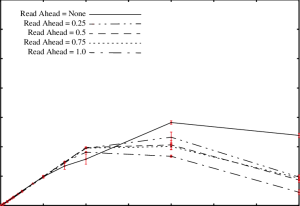
Without going into customer specific details I can tell you that right here in 2017 some workloads are very random, and truly random reads benefit very little from read ahead cache. In fact what can happen is that the storage just gets jammed up feeding data to the read ahead cache. If every 128 KiB random read gets translated into a 32 MiB read ahead and you start hitting high I/O rates then you can expect latency to go through the roof, and no amount of tuning at the storage end is going to help you.
So, if you’re diagnosing latency problems on a heavy random read workload, remember to ask your server admins about their read ahead settings.
Filed under: Uncategorized | Leave a comment »
Hey folks, just a quick post for you based on recent experience of IBM’s NAS Comprestimator utility for Storwize V7000 Unified where it completely failed to predict an outcome that I had personally predicted 100% accurately, based on common sense. The lesson here is that you should read the NAS Comprestimator documentation very carefully before you trust it (and once you read and understand it you’ll realize that there are some situations in which you simply cannot trust it).
We all know that Comprestimator is a sampling tool right? It looks at your actual data and works out the compression ratio you’re likely to get… well, kind of…
Let’s look first at the latest IBM spiel at https://www-304.ibm.com/webapp/set2/sas/f/comprestimator/home.html
“The Comprestimator utility uses advanced mathematical and statistical algorithms to perform the sampling and analysis process in a very short and efficient way.”
Cool, advanced mathematical and statistical algorithms – sounds great!
But there’s a slightly different story told on an older page that is somewhat more revealing http://m.ibm.com/http/www14.software.ibm.com/webapp/set2/sas/f/comprestimator/NAS_Compression_estimation_utility.html
“The NAS Compression Estimation Utility performs a very efficient and quick listing of file directories. The utility analyzes file-type distribution information in the scanned directories, and uses a pre-defined list of expected compression rates per filename extension. After completing the directory listing step the utility generates a spreadsheet report showing estimated compression savings per each file-type scanned and the total savings expected in the environment.
It is important to understand that this utility provides a rough estimation based on typical compression rates achieved for the file-types scanned in other customer and lab environments. Since data contained in files is diverse and is different between users and applications storing the data, actual compression achieved will vary between environments. This utility provides a rough estimation of expected compression savings rather than an accurate prediction.“
The difference here is that one is for NAS and one is for block, but I’m assuming that the underlying tool is the same. So, what if you have a whole lot of files with no extension? Apparently Comprestimator then just assumes 50% compression.
Below I reveal the reverse-engineered source code for the NAS Comprestimator when it comes to assessing files with no extension, and I release this under an Apache licence. Live Free or Die people.
#include<stdio.h>
 int main()

{

printf(“IBM advanced mathematical and statistical algorithms predict the following compression ratio: 50% \n”);

return 0;

}
enjoy : )
Filed under: Commvault, GPFS, storage, Storwize V7000 | 1 Comment »
… Here I am stuck in the middle with you (with apologies to Stealers Wheel)
Is Cloud forking? Lean mean Containers on the one hand, and fat rich Platform-as-a-Service on the other? Check out my latest blog post here and find out.

Filed under: Cloud | Leave a comment »
Check out my latest blog post at http://hubs.ly/H02PJ4r0

Filed under: Cloud, GPFS, N Series, Nimble, SONAS, storage | Leave a comment »
Tempted as I am to start explaining what containers are and why they make sense, I will resist that urge and assume for now you have all realised that they are a big part of our future whether that be on-premises or Public Cloud-based.
Containers are going to bring as much change to Enterprise IT as virtualization did back in the day, and knowing how to do it well is vital to success.
ViFX is bringing Ben Corrie, Containers super-guru, to New Zealand to help get the revolution moving.
Ben blogged about the potential for containers back in June 2015. Click on his photo for a quick recap:
![Ben_Corrie[1]](https://storagebuddhist.files.wordpress.com/2016/03/ben_corrie1.jpg?w=300&h=300)
Register now to hear one of the key architects of change in our industry speak in Auckland and Wellington in April, along with deep dive and demos in a 3 hour session. I would suggest to those further afield that this is also worth flying in from Australia, Christchurch etc.
~
And since it’s been a while since I finished a post with a link to youtube, here is The Fall doing “Container Drivers“.
Filed under: Cloud, VMware | Leave a comment »
As a follow-up to my earlier post comparing Object Storage to Block Storage, here’s a quick infographic to remind you of some of the key differences.
Object storage infographic 160321
Filed under: Uncategorized | Leave a comment »
Object Storage that is…
By now most of us have heard of Object Storage and the grand vision that life would be simpler if storage spent less time worrying about block placement on disks and walking up and down directory trees, and simply treated files like objects in a giant bucket, i.e. a more abstracted, higher level way to deal with storage.
May latest blog post is all about how Object Storage differs from traditional block and file, and also contains a bit of a drill down on some of the leading examples in the market today.
Head over to http://www.vifx.co.nz/blog/he-treats-me-like-an-object for the full post.
Filed under: Cloud, GPFS, Hyperconverged Storage | Leave a comment »
What is object storage and how does it differ from block and file?
Sign up for a free Object Storage seminar – discussion & examples – Tues, 16th Feb, 12-1.30pm, ViFX Auckland. lunch will be provided.
https://www.eventbrite.co.nz/e/object-storage-auckland-registration-19772808001
Filed under: Cloud, storage, VMware | Leave a comment »
The market for IT infrastructure components, including servers and storage, continues to fragment as the few big players of five years ago are augmented by a constant stream of new entrants and maturing niche players, but some things haven’t changed.
It should go without saying that choices in IT infrastructure should be driven by identified requirements. Requirements are informed by IT and business strategy and culture, and it is also perfectly reasonable that requirements are influenced by the personal comfort zones of those tasked with accountability for decisions and service delivery.
I once had a customer tell me that “My IT infrastructure strategy is Sun Microsystems” which was perhaps taking a personal comfort zone and brand loyalty a little too far. His statement told me that he did not really have an IT infrastructure strategy at all since he was being brand-led rather than requirements-driven.
Comfort zones can be important because they send us warning signals that we should assess risks, but I think we all recognise that they should not be used as an excuse to repeat what we have always done just because it worked last time.
I had an astute customer tell me recently that his current very flexible solution had served him well through a wide range of changes and significant growth over the last ten years, but that his next major infrastructure buying decision would probably be a significant departure in technology because he was looking to establish a platform for the next ten years, not the last ten years.
Any major investment opportunity in IT infrastructure is an opportunity to move the needle in terms of value and efficiency. To simply do again what you did last time is an opportunity missed.
Most of us realise that we are all prone to apply our own style of decision-making with its inevitable strengths and weaknesses. Personal decision-making is then layered with the challenges of teams and interaction as all of the points of view come together (hopefully not in a head-on collision). Knowing our strengths and weaknesses and how we interact in teams can help us to make a balanced decision.
Some multi-criteria mathematical theories claim that there is always ultimately a single rational choice, but ironically even mathematicians can’t agree on that. Bernoulli’s expected utility hypothesis for example suggests that there are multiple entirely rational choices depending on simple factors like how risk-averse the decision-makers are. Add to that the effect of past experience (Bayesian inference for the hard core) and mathematics can easily take you in a circle without really making your decision any more objective.
Knowing all of this, it is still useful to layer some structure onto our decision-making to ensure that we are focused on the requirements and on the end goal of essential business value, for example, use of weightings in decision-making has been a relatively common way of trying to introduce some objectivity into proposal evaluations.
Many of you will be familiar with the NIST definition of Cloud as having five essential characteristics which we have previously discussed on this blog. One way to measure the overall generic quality of a cloud offering is to evaluate that offering against the five characteristics, but I am suggesting that we take that one step further and that these essential characteristics can also be applied more broadly to any infrastructure decision as a first pass highlighter of relative merit and essential value.
In client specific engagements, if you were going to measure five qualities, it might make more sense to tailor the characteristics measured to specific client requirements, but as a generic first-pass tool we can simply use these five approximated NIST characteristics:
In pursuit of essential value, the modified NIST essential characteristics can be evaluated to arrive at a “web of essential value” by rating the options from zero to five and plotting them onto a radar diagram.
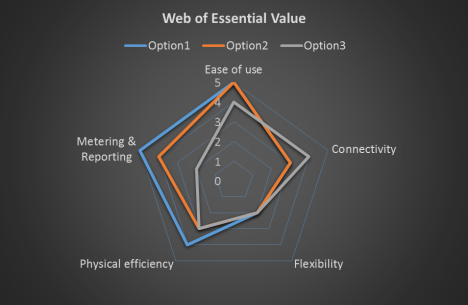
You still have to do all your own analysis so I don’t think we’re going to be threatening the Forrester Wave or the Gartner Magic Quadrant any time soon. Rather than being a way to present pre-formed analysis and opinion, WEV is a way for you to think about your options with an approach inspired by NIST’s definition of Cloud essential characteristics.
WEV is not intended to be your only tool, but it might be an interesting place to start in your evaluations.
The next time you have an IT infrastructure choice to make, why not start with the Web of Essential Value? I’d be keen to hear if you find it useful. The only other guidance I would offer is not to be too narrow in your interpretation of the five essential characteristics.
I wish you all good decision-making.
Filed under: Cloud | Leave a comment »
I’ve been brushing up on my William Deming recently so I’ve been thinking a lot about change and how change does not always come easily. Markets keep changing and companies as well as people need to learn to adapt.
We can probably all recall brands that were dominant once, but now have faded. Some of the famous brands of my parent’s generation like Jaguar cars, and British Seagull faded quickly in the face of German and Japanese innovation and quality.
One of the most shocking examples is Eastman Kodak. Founded in 1888, they held around 90% of the film market in the United States during the 1970s and went on to invent much of the technology used in digital cameras. But essentially they were a film company and when their own invention overtook them they were not prepared. Kodak eventually emerged from Chapter 11 in 2013 with a very different and much smaller business. Do we say that this was a complete failure of Kodak’s management in the 1970s, or do we say that it was almost inevitable given the size of Kodak and the complete and rapid technological change that occurred?
Even very large, well established companies can cope with rapid technological change if they react appropriately. It is possible to turn a big ship. Two examples from the Information Technology industry, Hewlett Packard (est. 1939) and IBM (est. 1911) have, so far, managed to adapt as their markets undergo huge change. The future is always uncertain and both have suffered major setbacks at times, but both continue to be top tier players in their target markets.
Of those who failed to adapt, another famous example is Firestone. Founded in 1900 they followed Ford into the automobile era, but failed to keep up with the market move to radial tyres in the late 1960s. They then then ran into several years of serious manufacturing quality problems which greatly reduced their brand value. In 1988 they were purchased by Bridgestone of Japan. One interesting thing about Firestone was that they had an unusually homogeneous management team, most of whom lived in Akron Ohio and many of them were born there. In management studies this homogeneity has come under some suspicion as a contributing factor to their reluctance and then inability to innovate. It might be significant if we compare that with the strife that IBM got into in the early 1990s and the board’s decision to appoint the first outsider CEO who subsequently turned the company around at that time, a feat that was at least in part attributed to his lack of emotional attachment to past decisions.
These are big bold examples and we can no doubt find other examples closer to home.
With brands and whole companies, failures to innovate will eventually become obvious, but with projects and IT departments, the consequences of failure to innovate can be less obvious for a time.
So why would anyone choose to avoid innovation and change? I can think of four reasons straight off.
These are all examples of what Edward De Bono would call Black Hat thinking, which is very common in the world of I.T. Black Hat thinking is of course valid as part of a broader consideration, but it is not a substitute for broader consideration.
Perhaps the biggest thematic change in I.T. Infrastructure over the years has been commoditization. My background is largely in storage systems and I see commoditization as having a huge impact. In the past storage vendors have made use of commodity hardware, but integrated it into their products so that the products themselves were not commoditized.
It is no secret among I.T. vendors that manufacturer margins are dramatically higher on storage systems than on servers so new storage solutions based on truly commoditized servers can be expected to have a significant impact.
Not only does hardware commoditization underpin most cloud services like Azure, AWS and vCloud Air, but hardware commoditization is also a driver behind on-premises hyper-converged storage systems like VMware Virtual SAN. With hardware commoditization, the value piece of the pie becomes much more focused on the software function.
But hardware commoditization is only one example of change in our industry. The real issue is one of being willing to take advantage of change.
I started off this post with a reference to William Deming. 70 years ago he put forward his ideas on continuous improvement and those ideas are currently enjoying a new lease of life expressed through ITIL.
Three of the questions Deming said we need to ask ourselves are:
Together the answers to these questions help us to form a strategy.
External IT consultants can be useful in all three of these steps in helping to frame the challenges against a background of cross-pollinated ideas and capabilities from around the market. Consultants can also help you to consider the realistic bite sizes for innovation and the associated risks. But ultimately change and innovation is something that we all have to take responsibility for. And like they sing in Memphis Change Don’t Come Easy.
[a version of this post was originally released at http://www.vifx.co.nz/blog/embracing-cloud-innovation]
Filed under: The Nature of Man | Leave a comment »
I have been watching the multi-site distributed NAS space for some years now. There have been some interesting products including Netapp’s Flexcache which looked nice but never really seemed to get market traction, and similarly IBM Global Active Cloud Engine (Panache) which was released as a feature of SONAS and Storwize V7000 Unified. Microsoft have played on the edge of this field more successfully with DFS Replication although that does not handle locking. Other technologies that encroach on this space are Microsoft Sharepoint and also WAN acceleration technologies like Microsoft Branchcache and Riverbed.
What none of these have been very good at however is solving the problem of distributed collaborative authoring of large complex multi-layered documents with high performance and sturdy locking. For example cross-referenced CAD drawings.

It’s no surprise that the founders of Panzura came from a networking background (Aruba, Alteon) since the issues to be solved are those that are introduced by the network. Panzura is a global file system tuned for CAD files and it’s not unusual to see Panzura sites experience file load times less than one tenth or sometimes even one hundredth of what they were prior to Panzura being deployed.
Rather than just provide efficient file locking however, Panzura has taken the concept to the Cloud, so that while caching appliances can be deployed to each work site, the main data repository can be in Amazon S3 or Azure for example. Panzura now claims to be the only proven global file locking solution that solves cross-site collaboration issues of applications like Revit, AutoCAD, Civil3D, and Bentley MicroStation as well as SOLIDWORKS CAD and Siemens NX PLM applications. The problems of collaboration in these environments are well-known to CAD users.

Panzura has been growing rapidly, with 400% revenue growth in 2013 and they have just come off another record quarter and a record year for 2014. Back in 2013 they decided to focus their energies on the Architectural, Engineering & Construction (so-called AEC) markets since that was where the technology delivered the greatest return on customer investment. In that space they have been growing more than 1000% per year.
ViFX recently successfully supplied Panzura to an international engineering company based in New Zealand. If you have problems with shared CAD file locking, please contact ViFX to see how we can solve the problem using Panzura.

Filed under: Cloud, N Series, SONAS, Storwize V7000 | Leave a comment »
My wife has been complaining that we don’t have enough cupboard space, both in the kitchen, and also for linen. On the weekend we bought a dining room cabinet, and that allowed my wife to reorganize the kitchen cupboards and pantry.
What came to light was that the pantry in particular was so overloaded that it was very difficult to tell what was in there, and as a result we discovered that there were six bottles of cooking oil (three of rice bran oil, three of olive oil), three containers with standard flour, two with high grade flour, two with rice, two with brown sugar, two with white sugar, two with opened packets of malt biscuits, two with opened packets of crackers etc.
More capacity is always nice. My wife’s solution involved spending money on buying additional capacity, and also effort to select and install the cabinet, and hours to sort through the existing cupboards and drawers and pantry to work out what was there and decide where best to put things.
I have however always maintained that the real problem is that we own too much stuff. If the cupboards had been better organised in the first place, we would have owned fewer duplicates, and the odds are we would not have needed the new cabinet. But new capacity is always nice.
I am sure you have realised by now that the parallel with the world of IT Storage did not escape me. If I had to pay for ongoing support on the new cabinet and I knew it was only going to last 5 years, I would have been less keen on the acquisition and would have pushed back harder with the “we own too much stuff” line.
It seems that it’s easier to add more capacity than to ask the hard questions, but that’s not always a wise use of money.
To read more about right-sizing check out http://www.vifx.co.nz/iaas-not-as-is/
Filed under: The Nature of Man | Leave a comment »
Back in 2011 I blogged on buying a new car, entitled the anatomy of a purchase. Well, the transmission on the Jag has given out and I am now the proud owner of a Toyota Mark X.

The anatomy of the purchase was however a little different this time. Over the last 4 years and I found that the official Jaguar service agents (25 Kms away) offered excellent support. 25 Kms is not always a convenient distance however, so I did try using local neighbourhood mechanics for minor things, but quickly realized that they were going to struggle with anything more complicated.
When it came to buying a replacement, the proximity of a fully trained and equipped service agent became my number one priority. There is only one such agency in my neighbourhood, and that is Toyota, so my first decision was that I was going to buy a Toyota.
Coming from a traditional I.T. vendor background my approach to I.T. support has always been that it should be fully contracted 7 x 24, preferably with a 2 hour response time, for anything that business depended on. But something has changed.
The support requirements for software haven’t really changed, but hardware is now a different game. Clustered systems, scale-out systems, web-scale systems, including hyper-converged (server/storage) systems will typically quickly re-protect a system after a node failure, thereby removing the need for panic-level hardware support response. Scale-out systems have a real advantage over standalone servers and dual controller storage systems in this respect.
It has taken me some time to get used to not having 7×24 on-site hardware support, but the message from customers is that next-business-day service or next+1 is a satisfactory hardware support model for clustered mission-critical systems.

Nutanix gold level support for example, offers next-business-day on-site service (after failure confirmation) or next+1 if the call is logged after 3pm so, given a potential day or two delay, it is worth asking the question “What happens if a second node fails?”
If the second node failure occurs after the data from the first node has been re-protected, then there will only be the same impact as if one host had failed. You can continue to lose nodes in a Nutanix cluster provided the failures happen after the short re-protection time, and until you run out of physical space to re-protect the VM’s. (Readers familiar with the IBM XIV distributed cache grid architecture will also recognise this approach to rinse-and-repeat re-protection.)
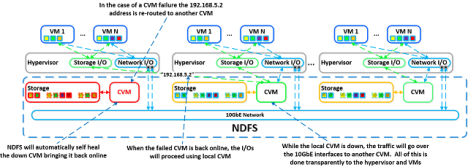
This is discussed in more detail in a Nutanix blog post by Andre Leibovici.
To find out more about options for scale-out infrastructure, try talking to ViFX.

Filed under: Hyperconverged Storage, Nutanix, VMware, XIV | Leave a comment »
Just a quick blog post today in the run up to Christmas week and I thought I’d briefly summarize some of the things I have been dealing with recently and also touch on the role of the I.T. department as we move boldly into a cloudy world.
We have seen I.T. move through the virtualization phase to deliver greater efficiency and some have moved on to the Cloud phase to deliver more automation, elasticity and metering. Cloud can be private, public, community or hybrid, so Cloud does not necessarily imply an external service provider.
One of the things that has become clear is the need for right-sizing as part of any move to an external provider. External provision has a low base cost and a high metered cost, so you get best value by making sure your allowances for CPU, RAM and disk are a reasonably tight fit with your actual requirements, and relying on service elasticity to expand as needed. The traditional approach of building a lot of advance headroom into everything will cost you dearly. You cannot expect an external provider to deliver “your mess for less” and in fact what you will get if you don’t right size is “your mess for more”.
And it’s not necessarily true that all of your services are best met by the one or two tiers that a single Cloud provider offers. This is where the Hybrid Cloud comes in, and more than that, this is where a Cloud Management Platform (CMP) function comes in.
“Any substantive cloud strategy will ultimately require using multiple cloud services from different providers, and a combination of both internal and external cloud.” Gartner, September 2013, (Hybrid Cloud Is Driving the Shift From Control to Coordination).
A CMP such as VMware’s vRealize Automation, RightScale, or Scalr can actually take you one step further than a simple Hybrid Cloud. A CMP can allow you to right-locate your services in a policy-driven and centrally managed way. This might mean keeping some services in-house, some in an enterprise I.T. focused Cloud with a high level of performance and wrap-around services, and some in a race-to-the-bottom Public Cloud focused primarily on price.
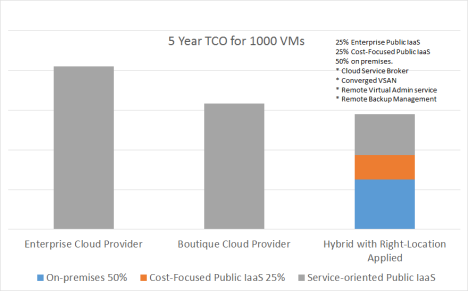
Some organisations are indeed consuming multiple services from multiple providers, but very few are managing this in a co-ordinated policy-driven manner. The kinds of problems than can arise are:
This layer of policy and management has a natural home with the I.T. department, but as an enabler for enterprise-wide in-policy consumption rather than as an obstacle.

With the Service Brokering Capability, I.T. becomes the central point of control, provision, self-service and integration for all IT services regardless of whether they are sourced internally or externally. This allows an organisation to mitigate the risks and take the opportunities associated with Cloud.

I will be enjoying the Christmas break and extending that well into January as is traditional in this part of the world where Christmas coincides with the start of Summer.
Happy holidays to all.
Filed under: Cloud | Leave a comment »
 I remember being entertained by Larry Ellison’s Cloud Computing rant back in 2009 in which he pointed out that cloud was really just processors and memory and operating systems and databases and storage and the internet. While Larry was making a valid point, and he also made a point about IT being a fashion-driven industry, the positive goals of Cloud Computing should by now be much clearer to everyone.
When we talk about Cloud Computing it’s probably important that we try to work from a common understanding of what Cloud is and what the terms mean, and that’s where NIST comes in.
The National Institute of Standards and Technology (NIST) is an agency of the US Department of Commerce. In 2011, two years after Larry Ellison’s outburst, and after many drafts and years of research and discussion, NIST published their ‘Cloud Computing Definition’ stating:
“The definition is intended to serve as a means for broad comparisons of cloud services and deployment strategies, and to provide a baseline for discussion from what is cloud computing to how to best use cloud computing”.
“When agencies or companies use this definition they have a tool to determine the extent to which the information technology implementations they are considering meet the cloud characteristics and models. This is important because by adopting an authentic cloud, they are more likely to reap the promised benefits of cloud—cost savings, energy savings, rapid deployment and customer empowerment.”
The definition lists the five essential characteristics, the three service models and the four deployment models. I have summarized them in this blog post so as to do my small bit in encouraging the adoption of this definition as widely as possible to give us a common language and measuring stick for assessing the value of Cloud Computing.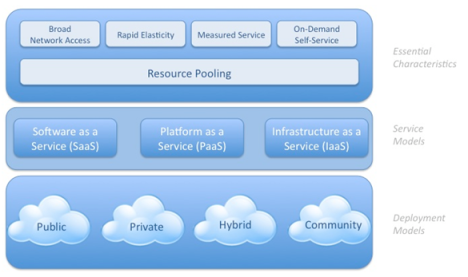
Note that NIST has resisted the urge to go on to define additional services such as Backup as a Service (BaaS), Desktop as a Service (DaaS), Disaster Recovery as a Service (DRaaS) etc, arguing that these are already covered in one way or another by the three ‘standard’ service models. This does lead to an interesting situation where one vendor will offer DRaaS or BaaS effectively as an IaaS offering, and another will offer it under more of a SaaS or PaaS model.
The NIST reference architecture also talks about the importance of the brokering function, which allows you to seamlessly deploy across a range of internal and external resources according to the policies you have set (e.g. cost, performance, sovereignty, security).
The NIST definition of Cloud Computing is the one adopted by ViFX and it is the simplest, clearest and best-researched definition of Cloud Computing I have come across.
On 22nd October 2014 NIST published a new document “US Government Cloud Computing Technology Roadmap” in two volumes which identifies ten high priority requirements for Cloud Computing adoption across the five areas of:
The purpose of the document is to provide a cloud roadmap for US Government agencies highlighting ten high priority requirements to ensure that the benefits of cloud computing can be realized. Requirements seven and eight are particular to the US-Government but the others are generally applicable. My interpretation of NIST’s ten requirements is as follows:
These are all worthwhile requirements, and there’s also a loopback here to some of Larry Ellison’s comments. Larry spoke about seeing value in rental arrangements, but also touched on the importance of innovation. NIST is trying to standardize and level the playing field to maximize value for consumers, but history tells us that vendors will try to innovate to differentiate themselves. For example, with the launch of VMware’s vCloud Air we are seeing the dominant player in infrastructure management software today staking its claim to establish itself as the de facto software standard for hybrid cloud. But that is really a topic for another day…

Filed under: Cloud | Leave a comment »
I recall Tom West (Chief Scientist at Data General, and star of Soul of a New Machine) once saying to me when he visited New Zealand that there was an old saying “Hardware lasts three years, Operating Systems last 20 years, but applications can go on forever.”
Over the years I have known many application developers and several development managers, and one thing that they seem to agree on is that it is almost impossible to maintain good code structure inside an app over a period of many years. The pressures of deadlines for features, changes in market, fashion and the way people use applications, the occasional weak programmer, and the occasional weak dev manager, or temporary lapse in discipline due to other pressures all contribute to fragmentation over time. It is generally by this slow attrition that apps end up being full of structural compromises and the occasional corner that is complete spaghetti.
I am sure there are exceptions, and there can be periodic rebuilds that improve things, but rebuilds are expensive.
If I think about the OS layer, I recall Data General rebuilding much of their DG/UX UNIX kernel to make it more structured because they considered the System V code to be pretty loose. Similarly IBM rebuilt UNIX into a more structured AIX kernel around the same time, and Digital UNIX (OSF/1) was also a rebuild based on Mach. Ironically HPUX eventually won out over Digital UNIX after the merger, with HPUX rumoured to be the much less structured product, a choice that I’m told has slowed a lot of ongoing development. Microsoft rebuilt Windows as NT and Apple rebuilt Mac OS to base it on the Mach kernel.
So where am I heading with this?
Well I have discussed this topic with a couple of people in recent times in relation to storage operating systems. If I line up some storage OS’s and their approximate date of original release you’ll see what I mean:
| Netapp Data ONTAP | 1992 | 22 years |
| EMC VNX / CLARiiON | 1993 | 21 years |
| IBM DS8000 (assuming ESS code base) | 1999 | 15 years |
| HP 3PAR | 2002 | 12 years |
| IBM Storwize | 2003 | 11 years |
| IBM XIV / Nextra | 2006 | 8 years |
| Nimble Storage | 2010 | 4 years |
I’m not trying to suggest that this is a line-up in reverse order of quality, and no doubt some vendors might claim rebuilds or superb structural discipline, but knowing what I know about software development, the age of the original code is certainly a point of interest.
With the current market disruption in storage, cost pressures are bound to take their toll on development quality, and the problem is amplified if vendors try to save money by out-sourcing development to non-integrated teams in low-cost countries (e.g. build your GUI in Romania, or your iSCSI module in India).

Filed under: N Series, Nimble, SAN Volume Controller, Storwize V7000, XIV | 8 Comments »
 Decoupling storage performance from storage capacity is an interesting concept that has gained extra attention in recent times. Decoupling is predicated on a desire to scale performance when you need performance and to scale capacity when you need capacity, rather than traditional spindle-based scaling delivering both performance and capacity.
Also relevant is the idea that today’s legacy disk systems are holding back app performance. For example, VMware apparently claimed that 70% of all app performance support calls were caused by external disk systems.
IT operations have spent the last 10 years trying to keep up with capacity growth, with less focus on performance growth. The advent of flash has however shown that even though you might not have a pressing storage performance problem, if you add flash your whole app environment will generally run faster and that can mean business advantages ranging from better customer experiences to more accurate business decision making.
My favorite example of performance affecting customer experience is from my past dealings with an ISP of whom I was a residential customer. I was talking to a call centre operator who explained to me that ‘the computer was slow’ and that it would take a while to pull up the information I was seeking. We chatted as he slowly navigated the system, and as we waited, one of the things he was keen to chat about was how much he disliked working for that ISP : o
I have previously referenced a mobile phone company in the US who replaced all of their call centre storage with flash, specifically so as to deliver a better customer experience. The challenge with that is cost. The CIO was quoted as saying that the cost to go all flash was not much more per TB than he had paid for tier1 storage in the previous buying cycle (i.e. 3 or maybe 5 years earlier). So effectively he was conceding that he was paying more per TB for tier1 storage now than he was some years ago. Because the environment deployed did not decouple performance from capacity however, that company has almost certainly significantly over-provisioned storage performance, hence the cost per TB being higher than on the last buying cycle.
There are many examples of storage performance improvements leading to better business decisions, most typically in the area of data warehousing. When business intelligence reports have more up to date data in them, and they run more quickly, they are used more often and decisions are more likely to be evidence-based rather than based on intuition. I recall one CIO telling me about a meeting of the executive leadership team of his company some years ago where each exec was asked to write down the name of the company’s largest supplier – and each wrote a different name – illustrating the risk of making decisions based on intuition rather than on evidence/business intelligence.
Of course we have always been able to decouple performance and capacity to some extent, and it was traditionally called tiering. You could run your databases on small fast drives RAID10 and your less demanding storage on larger drives with RAID5 or RAID6. What that didn’t necessarily give you was a lot of flexibility.
Products like IBM’s SAN Volume Controller introduced flexibility to move volumes around between tiers in real-time, and more recently VMware’s Storage vMotion has provided a sub-set of the same functionality.
And then sub-lun tiering (Automatic Data Relocation, Easy Tier, FAST, etc) reduced the need for volume migration as a means of managing performance, by automatically promoting hot chunks to flash, and dropping cooler chunks to slower disks. You could decouple performance from capacity somewhat by choosing your flash to disk ratio appropriately, but you still typically had to be careful with these solutions since the performance of, for example, random writes that do not go to flash would be heavily dependent on the disk spindle count and speed.
So for the most part, decoupling storage performance and capacity in an existing disk system has been about adding flash and trying not to hit internal bottlenecks.
Traditional random I/O performance is therefore a function of:
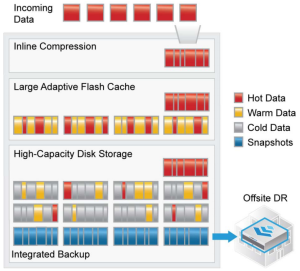
Nimble Storage uses flash to accelerate random reads, and accelerates writes through compression into sequential 4.5MB stripes (compare this to IBM’s Storwize RtC which compresses into 32K chunks and you can see that what Nimble is doing is a little different).
Nimble performance is therefore primarily a function of
The number of spindles is not quite so important when you’re writing 4.5MB stripes. Nimble systems generally support at least 190 TB nett (if I assume 1.5x compression average, or 254 TB if you expect 2x) from 57 disks and they claim that performance is pretty much decoupled from disk space since you will generally hit the wall on flash and CPU before you hit the wall on sequential writes to disk. Also this kind of decoupling allows you to get good performance and capacity in a very small amount of rack space. Nimble also offers CPU scaling in the form of a scale-out four-way cluster.
Nimble have come closer to decoupling performance and capacity than any other external storage vendor I have seen.
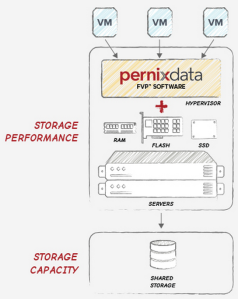
PernixData Flash Virtualization Platform (FVP) is a software solution designed to build a flash read/write cache inside a VMware ESXi cluster, thereby accelerating I/Os without needing to add anything to your external disk system. PernixData argue that it is more cost effective and efficient to add flash into the ESXi hosts than it is to add them into external storage systems. This has something in common with the current trend for converged scale-out server/storage solutions, but PernixData also works with existing external SAN environments.
There is criticism that flash technologies deployed in external storage are too far away from the app to be efficient. I recall Amit Dave (IBM Distinguished Engineer) recounting an analogy of I/O to eating, for which I have created my own version below:
PernixData works by keeping your data closer to the CPU – decoupling performance and capacity by focusing on a server-side caching layer and scaling alongside your compute ESXi cluster. So this is analagous to getting food from your table rather than food from your garden. With PernixData you tend to scale performance as you add more compute nodes, rather than when you add more back-end capacity.
Decoupling as a theoretical concept is surely a good thing – independent scaling in two dimensions – and it is especially nice if it can be done without introducing significant extra cost, complexity or management overhead.
It is however probably also fair to say that many other systems can approximate the effect, albeit with a little more complexity.
———————————————————————————————————-
Disclosures:
Jim Kelly holds PernixPrime accreditation from PernixData and is a certified Nimble Storage Sales Professional. ViFX is a reseller of both Nimble Storage and PernixData.
Filed under: Flash, Nimble, PernixData, VMware | Leave a comment »
The clustered/scale-out storage world keeps getting more and more interesting and for some they would say more and more confusing.
There are too many to list them all here, but here are block diagrams depicting seven interesting storage or converged hardware architectures. See if you can decipher my diagrams and match the labels by choosing between the three sets of options in the multi-choice poll at the bottom of the page:
| A | VMware EVO: RACK |
| B | IBM XIV |
| C | VMware EVO: RAIL |
| D | Nutanix |
| E | Nimble |
| F | IBM GPFS Storage Server (GSS) |
| G | VMware Virtual SAN |
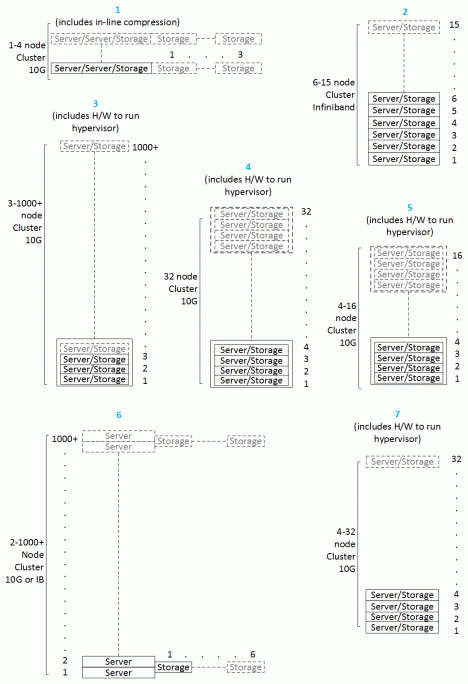
| A | VMware EVO: RACK |
| B | IBM XIV |
| C | VMware EVO: RAIL |
| D | Nutanix |
| E | Nimble |
| F | IBM GPFS Storage Server (GSS) |
| G | VMware Virtual SAN |
Filed under: GPFS, Hyperconverged Storage, Nimble, Nutanix, VMware, XIV | 2 Comments »
This is simply a re-blogging of an interesting discussion by James Knapp at http://www.vifx.co.nz/testing-the-hyper-convergence-waters/ looking at VMware Virtual SAN. Even more interesting than the blog post however is the whitepaper “How hypervisor convergence is reinventing storage for the pay-as-you-grow era” which ViFX has come up with as a contribution to the debate/discussion around Hypervisor storage.
I would recommend going to the first link for a quick read of what James has to say and then downloading the whitepaper from there for a more detailed view of the technology.
Filed under: Hyperconverged Storage, VMware | Leave a comment »
The phrase ‘Software-defined Storage’ (SDS) has quickly become one of the most widely used marketing buzz terms in storage. It seems to have originated from Nicira’s use of the term ‘Software-defined Networking’ and then adopted by VMware when they bought Nicira in 2012, where it evolved to become the ‘Software-defined Data Center’ including ‘Software-defined Storage’. VMware’s VSAN technology therefore has the top of mind position when we are talking about SDS. I really wish they’d called it something other than VSAN though, so as to avoid the clash with the ANSI T.11 VSAN standard developed by Cisco.
I have seen IBM regularly use the term ‘Software-defined Storage’ to refer to:
I recently saw someone at IBM referring to FlashSystem 840 as SDS even though to my mind it is very much a hardware/firmware-defined ultra-low-latency system with a very thin layer of software so as to avoid adding latency.
Interestingly, IBM does not seem to market XIV as SDS, even though it is clearly a software solution running on commodity hardware that has been ‘applianced’ so as to maintain reliability and supportability.
Let’s take a quick look at the contenders:
1. GPFS: GPFS is a file system with a lot of storage features built in or added-on, including de-clustered RAID, policy-based file tiering, snapshots, block replication, support for NAS protocols, WAN caching, continuous data protection, single namespace clustering, HSM integration, TSM backup integration, and even a nice new GUI. GPFS is the current basis for IBM’s NAS products (SONAS and V7000U) as well as the GSS (gpfs storage server) which is currently targeted at HPC markets but I suspect is likely to re-emerge as a more broadly targeted product in 2015. I get the impression that gpfs may well be the basis of IBM’s SDS strategy going forward.
2. Storwize: The Storwize family is derived from IBM’s SAN Volume Controller technology and it has always been a software-defined product, but tightly integrated to hardware so as to control reliability and supportability. In the Storwize V7000U we see the coming together of Storwize and gpfs, and at some point IBM will need to make the call whether to stay with the DS8000-derived RAID that is in Storwize currently, or move to the gpfs-based de-clustered RAID. I’d be very surprised if gpfs hasn’t already won that long-term strategy argument.
3. Virtual Storage Center: The next contender in the great SDS shootout is IBM’s Virtual Storage Center and it’s sub-component Tivoli Storage Productivity Center. Within some parts of IBM, VSC is talked about as the key to SDS. VSC is edition dependent but usually includes the SAN Volume Controller / Storwize code developed by IBM Systems and Technology Group, as well as the TPC and FlashCopy Manager code developed by IBM Software Group, plus some additional TPC analytics and automation. VSC gives you a tremendous amount of functionality to manage a large complex site but it requires real commitment to secure that value. I think of VSC and XIV as the polar opposites of IBM’s storage product line, even though some will suggest you do both. XIV drives out complexity based on a kind of 80/20 rule and VSC is designed to let you manage and automate a complex environment.
Commodity Hardware: Many proponents of SDS will claim that it’s not really SDS unless it runs on pretty much any commodity server. GPFS and VSC qualify by this definition, but Storwize does not, unless you count the fact that SVC nodes are x3650 or x3550 servers. However, we are already seeing the rise of certified VMware VSAN-ready nodes as a way to control reliability and supportability, so perhaps we are heading for a happy medium between the two extremes of a traditional HCL menu and a fully buttoned down appliance.
Product Strategy: While IBM has been pretty clear in defining its focus markets – Cloud, Analytics, Mobile, Social, Security (the ‘CAMSS’ message that is repeatedly referred to inside IBM) I think it has been somewhat less clear in articulating a clear and consistent storage strategy, and I am finding that as the storage market matures, smart people are increasingly wanting to know what the vendors’ strategies are. I say vendors plural because I see the same lack of strategic clarity when I look at EMC and HP for example. That’s not to say the products aren’t good, or the roadmaps are wrong, but just that the long-term strategy is either not well defined or not clearly articulated.
It’s easier for new players and niche players of course, and VMware’s Software-defined Storage strategy, for example, is both well-defined and clearly articulated, which will inevitably make it a baseline for comparison with the strategies of the traditional storage vendors.
A/NZ STG Symposium: For the A/NZ audience, if you want to understand IBM’s SDS product strategy, the 2014 STG Tech Symposium in August is the perfect opportunity. Speakers include Sven Oehme from IBM Research who is deeply involved with gpfs development, Barry Whyte from IBM STG in Hursley who is deeply involved in Storwize development, and Dietmar Noll from IBM in Frankfurt who is deeply involved in the development of Virtual Storage Center.
Filed under: Flash, GPFS, SAN Volume Controller, SONAS, Storwize V7000, Tivoli, VMware, XIV | Leave a comment »
Just a quick post to let readers know that I have resigned from IBM after 14 years with the company and I’m looking forward to starting work at ViFX on Monday 11th August, which it seems also happens to be Steve Wozniak‘s birthday.
I will work out in time what this means for the blog (my move to ViFX, not Steve’s birthday) but it’s pretty likely that I will also start looking at some non-IBM technologies – maybe including such things as VMware, Nutanix, Commvault, Actifio, Violin and Nimble Storage.
And having failed to create any meaningful link whatsoever between my move and the birth of the Woz I will leave it at that… until the 11th : )
Filed under: Actifio, Commvault, Flash, Nimble, Nutanix, Violin, VMware | 1 Comment »
Back in 2012 after IBM announced Real-time Compression (RtC) for Storwize disk systems I covered the technology in a post entitled “Freshly Squeezed“. The challenge with RtC in practice turned out to be that on many workloads it just couldn’t get the CPU resources it needed, and I/O rates were very disappointing, especially in its newly-released un-tuned state,
We quickly learned that lesson and IBM’s Disk Magic was an essential tool to warn us aboout unsuitable workloads. Even in August 2013 when I was asked at the Auckland IBM STG Tech Symposium “Do you recommend RtC for general use?” My answer was “Wait until mid 2014”.
Now that the new V7000 (I’m not sure we’re supposed to call it Gen2, but that works for me) is out, I’m hoping that time has come.
The New V7000: I was really impressed when we announced the new V7000 in May 2014 with it’s 504 disk drives, faster CPUs, 2 x RtC (Intel Coleto Creek comms encryption processor) offload engines per node canister, and extra cache resources (up to 64GB RAM per node canister, of which 36GB is dedicated to RtC) but having been caught out in 2012, I wanted to see what Disk Magic had to say about it before I started recommending it to people. That’s why this post has taken until now to happen – Disk Magic 9.16.0 has just been released.
After a quick look at Disk Magic I almost titled this post “Bigger, Better, Juicier than before” but I felt I should restrain myself a little, and there are still a few devils in the details.
50% Extra: I have been working on the conservative assumption of getting an extra 50% nett space from RtC across an entire disk system if little was known about the data. It is best to run IBM’s Comprestimator so you can get a better picture if you have access to do that however.
Getting an extra 50% is the same as setting Capacity Magic to use 33% compression. Until now I believed that this was a very conservative position, but one thing I really don’t enjoy is setting an expectation and then being unable to deliver on it.
Easy Tier: The one major deficiency in Disk Magic 9.16.0 is that you can’t model Easy Tier and RtC in the same model. That is pretty annoying since on the new V7000 you will almost certainly want both. So unfortunately that means Disk Magic 9.16.0 is still a bit of a waste of time in testing most real-life configurations that include RtC and the real measure will have to wait until the next release due in August 2014.
What you can use 9.16.0 however is to validate the performance of RtC (without Easy Tier) and look at the usage on the new offload engines. What I found was that the load on the RtC engines is still very dependent on the I/O size.
I/O Size: When I am doing general modelling I used to use 16KB as a default size since that is the kind of figure I had generally seen in mixed workload environments, but in more recent times I have gone back to using the default of 4KB since the automatic cache modelling in Disk Magic takes a lot of notice of the I/O size when deciding how random the workload is likely to be. Using 4KB forces Disk Magic to assume that the workload is very random, and that once again builds in some headroom (all part of my under-promise+over-deliver strategy). If you use 16KB, or even 24KB as I have seen in some VMware environments, then Disk Magic will assume there are a lot of sequential I/Os and I’m not entirely comfortable with the huge modeled performance improvement you get from that assumption. (For the same reason these days I tend to model Easy Tier using the ‘Intermediate’ setting rather than the default/recommended ‘High Skew’ setting.)
However, using a small I/O size in your Disk Magic modelling has the exact opposite effect when modelling RtC. RtC runs really well when the I/O size is small, and not so well when the I/O size is large. So my past conservative practice of modelling a small I/O size might not be so conservative when it comes to RtC.
Different Data Types: In the past I have also tended to build Disk Magic models with one server, this is because my testing showed that having several servers or a single server gave the same result. All Disk Magic cared about was the number of I/O requests coming in over a given number of fibres. Now however we might need to take more careful account of data types and focus less on the overall average I/O size and more on the individual workloads and which are suitable for RtC and which are not.
50% Busy: And just as we should all be aware that going over 50% busy on a dual controller system is a recipe for problems should we lose a controller for any reason (and faults are also more likely to happen when the system is being pushed hard) similarly going over 50% busy on your Coleto Creek RtC offload engines would also lead to problems if you lose a controller.
I always recommend that you use all 4 compression engines +extra cache on each dual controller V7000 and now I’m planning to work on the assumption that, yes I can get 1.5:1 compression overall, but that is more likely to come from 50% being without compression and 50% being at 2:1 compression and my Disk Magic models will reflect that. So I still expect to need 66% physical nett to get to 100% target, but I’m now going to treat each model as being made up of at least two pools, one compressed and one not.
Transparent Compression: RtC on the new Gen2 V7000 is a huge improvement over the Gen1 V7000. The hardware has been specifically designed to support it, and remember that it is truly transparent and doesn’t lose compression over time or require any kind of batch processing. That all goes to make it a very nice technology solution that most V7000 buyers should take advantage of.
Filed under: Storwize V7000 | Leave a comment »
Ever since companies like Data General moved RAID control into an external disk sub-system back in the early ’90s it has been standard received knowledge that servers and storage should be separate.
While the capital cost of storage in the server is generally lower than for an external centralised storage subsystem, having storage as part of each server creates fragmentation and higher operational management overhead. Asset life-cycle management is also a consideration – servers typically last 3 years and storage can often be sweated for 5 years since the pace of storage technology change has traditionally been slower than for servers.
When you look at some common storage systems however, what you see is that they do include servers that have been ‘applianced’ i.e. closed off to general apps, so as to ensure reliability and supportability.
At one point the DS8000 was available with LPAR separation into two storage servers (intended to cater to a split production/non-production environment) and there was talk at the time of the possibility of other apps such as TSM being able to be loaded onto an LPAR (a feature that was never released).
Apps or features?: There are a bunch of apps that could be run on storage systems, and in fact many already are, except they are usually called ‘features’ rather than apps. The clearest examples are probably in the NAS world, where TSM and Space Management and SAMBA/CTDB and Ganesha/NFS, and maybe LTFS, for example, could all be treated as features.
I also recall Netapp once talking about a Fujitsu-only implementation of ONTAP that could be run in a VM on a blade server, and EMC has talked up the possibility of running apps on storage.
GPFS: In my last post I illustrated an example of using IBM’s GPFS to construct a server-based shared storage system. The challenge with these kinds of systems is that they put onus onto the installer/administrator to get it right, rather than the traditional storage appliance approach where the vendor pre-constructs the system.
Virtualization: Reliability and supportability are vital, but virtualization does allow the possibility that we could have ring-fenced partitions for core storage functions and still provide server capacity for a range of other data-oriented functions e.g. MapReduce, Hadoop, OpenStack Cinder & Swift, as well as apps like TSM and HSM, and maybe even things like compression, dedup, anti-virus, LTFS etc., but treated not so much as storage system features, but more as genuine apps that you can buy from 3rd parties or write yourself, just as you would with traditional apps on servers.
The question is not so much ‘can this be done’, but more, ‘is it a good thing to do’? Would it be a good thing to open up storage systems and expose the fact that these are truly software-defined systems running on servers, or does that just make support harder and add no real value (apart from providing a new fashion to follow in a fashion-driven industry)? My guess is that there is a gradual path towards a happy medium to be explored here.
Filed under: DS8000, GPFS, SAN Volume Controller, SONAS, Storwize V7000, Tivoli, VMware, XIV | Leave a comment »
GPFS (General Parallel File System) is one of those very cool technologies that you can do so much with that it’s actually fun to design solutions with it (provided you’re the kind of person that also gets a kick from a nice elegant mathematical proof by induction).
Back in 2010 I was asked by an IBM systems software strategist for my opinion as to whether GPFS had potential as a mainstream product, or if it was best kept back as an underlying component in mainstream solutions. I was strongly in the component camp, but now I almost regret that, because it may be that really the only thing that was holding GPFS back was the lack of its own comprehensive GUI. That is something I still hope will be addressed in the not too distant future.
Anyway, this is a sample design that attempts to show some of the things you can do with GPFS by way of building a software defined storage and server environment.
The central box shows GPFS servers (virtualized in this example) and the left and right boxes show GPFS clients. GPFS also supports ILM policies between disk tiers and out to LTFS tape, as well as optional integration with HSM (via Tivoli Space Management) and fast efficient backup with Tivoli Storage Manager.
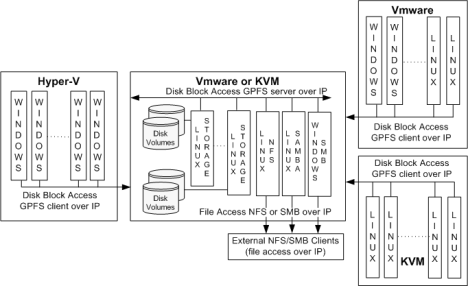
There are of course a few caveats and restrictions. Check out the GPFS infocenter for the technical details.
This second diagram shows a simpler view of how to build a highly available software defined storage environment. The example shows two physical servers, but you can add many servers and still have a single storage pool. Mirroring is on a per volume basis. Also you could use GPFS native RAID to build a RAID6 array in each server for example.
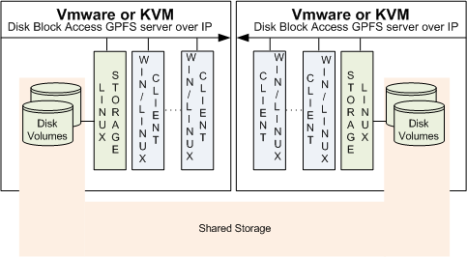
Filed under: GPFS, Tivoli, VMware | Leave a comment »
If you need scalable NAS and what you’re primarily interested in is capacity scaling, with less emphasis on performance, and more on cost-effective entry price, then you might be interested in building a scale-out NAS from Storwize V7000 Unified systems, especially if you have some block I/O requirements to go with your NAS requirements.
There are three ways that I can think of doing this and each has its strengths. The documentation on these options is not always easy to find, so these diagrams and bullets might help to show what is possible.
One key point that is not well understood is that clustering V7000 systems to a V7000U allows SMB2 access to all of the capacity – a feature that you don’t get if you virtualize secondary systems rather than cluster them.
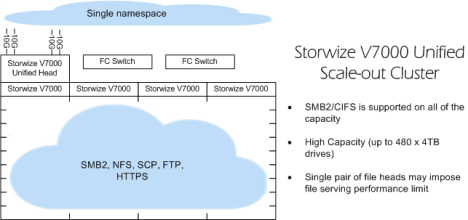
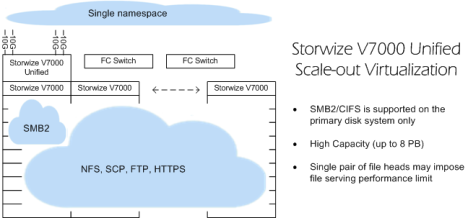
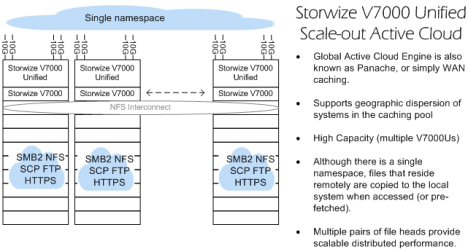
And of course systems management is made relatively simple with the Storwize GUI.
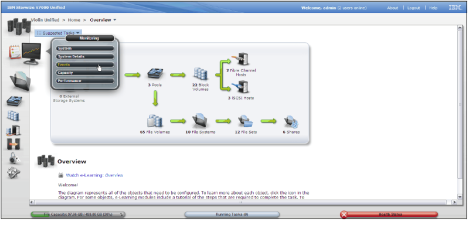
Filed under: SONAS, Storwize V7000 | 2 Comments »
IBM’s Flash strategy is a two-pronged approach, targeting the two segments that IDC labels as:
Last week I outlined the new FlashSystem 840 and focused mainly on the Absolute Performance aspect. Absolute Performance for IBM means latencies down around 95 microseconds write and 135 microseconds read, whereas most Flash storage systems in the market are talking 500+ microseconds best case. I’m guessing that in the new world of I/O bound applications, having 3 or 4 times the latency overhead could be a real problem for those vendors at some stage.
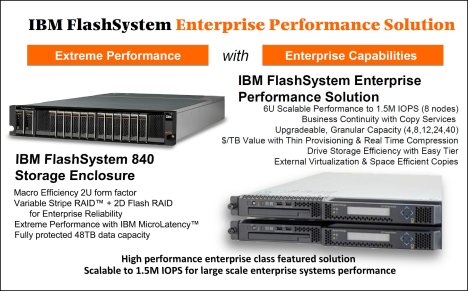
This week however I’d like to focus on the Enterprise Flash market segment.
When we and IDC talk about Enterprise we are more concerned with the software stack and how it is used to address issues of:
The short answer to all of these is IBM’s SAN Volume Controller. Folks who are not very familiar with SVC often assume that SVC adds latency to storage. In the case of spinning disk systems, my experience has been that SVC reduces latency (due to intelligent caching effects) but takes about 5% of the top of maximum native IOPS. In the real world that means that things will almost always go faster with SVC than without it.
In the case of Flash, the picture is slightly different. The latencies of the FlashSystem 840 are so low that SVC caching does not fully compensate for other effects and the nett is that putting SVC in front of your FlashSystem 840 is likely to add around 100 micro-seconds of latency.
Yes that’s right, only 100 micro-seconds. I should add that I have not personally verified this, but have been told that is what we are seeing in IBM’s internal lab tests.
When you add 100 micro-seconds to the low latency of the FlashSystem 840 (95 microseconds write, 135 microseconds read) you still have numbers down below 250 microseconds, which is twice as fast as the numbers quoted on products like XtremIO and Violin 6200.
Even way back in 2008 we announced a benchmark result of 1 million IOPS with SVC and Flash, code-named Quicksilver. At the time the IBM statement said that IBM was planning a complete end-to-end systems approach to Flash and…
“Performance improvements of this magnitude can have profound implications for business, allowing two to three times the work to [be completed] in a given time frame for . . . time-sensitive applications like reservations systems, and financial program trading systems, and creating opportunity for entirely new insights in information-warehouses and analytics solutions”So this is not new for IBM. The recently announced FlashSystem Solution with SVC is the culmination of six years of preparation (including SVC tuning) by IBM.
So you can understand now why IBM does not need to reinvent a whole separate scale-out offering of the sort that Whiptail Invicta (Cisco’s new EMC killer) and XtremIO Cluster (EMC’s new fat-boy SSD system) have tried to create. IBM can deliver a much more mature and feature-rich solution with consistent management and feature functions right across the board from the small V3700 with Easy Tier Flash right through to high-end SVC Flash Solutions like the one implemented by Sprint in 2013.
SVC brings proven data center credentials to scale-out Flash, delivering the full Storwize software stack while adding as little as 100 microseconds of latency. That is a good story and one that will not be easily matched by any competitor, and if the market would prefer something that is more tightly coupled from a hardware point of view then I don’t see why IBM couldn’t also deliver that in future if it wanted to.
So IBM has avoided the need to reinvent, develop, or buy-in a new immature scale-out mechanism for Flash. By using SVC you get FlashCopy snapshots and clones, as well as volume replication over IP, and Real-time Compression. But possibly most important of all is the full SVC interoperability matrix. How’s that for a software defined storage strategy that delivers rapid time-to-value in exactly the way it’s meant to.
For more info you can check out the IBM FlashSystem product page and the IBM Redbook Solution Guide “Implementing FlashSystem 840 with SAN Volume Controller”
Filed under: Flash, SAN Volume Controller | 3 Comments »
Flash storage is at an interesting place and it’s worth taking the time to understand IBM’s new FlashSystem 840 and how it might be useful.
A traditional approach to flash is to treat it like a fast disk drive with a SAS interface, and assume that a faster version of traditional systems are the way of the future. This is not a bad idea, and with auto-tiering technologies this kind of approach was mastered by the big vendors some time ago, and can be seen for example in IBM’s Storwize family and DS8000, and as a cache layer in the XIV. Using auto-tiering we can perhaps expect large quantities of storage to deliver latencies around 5 millseconds, rather than a more traditional 10 ms or higher (e.g. MS Exchange’s jetstress test only fails when you get to 20 ms).

Some players want to use all SSDs in their disk systems, which you can do with Storwize for example, but this is again really just a variation on a fairly traditional approach and you’re generally looking at storage latencies down around one or two millseconds. That sounds pretty good compared to 10 ms, but there are ways to do better and I suspect that SSD-based systems will not be where it’s at in 5 years time.
The IBM FlashSystem 840 is a little different and it uses flash chips, not SSDs. It’s primary purpose is to be very very low latency. We’re talking as low as 90 microseconds write, and 135 microseconds read. This is not a traditional system with a soup-to-nuts software stack. FlashSystem has a new Storwize GUI, but it is stripped back to keep it simple and to avoid anything that would impact latency.
This extreme low latency is a unique IBM proposition, since it turns out that even when other vendors use MLC flash chips instead of SSDs, by their own admission they generally still end up with latency close to 1 ms, presumably because of their controller and code-path overheads.
| Nett of 2-D RAID5 | 4 modules | 8 modules | 12 modules |
| 2GB modules | 4 TB | 12 TB | 20 TB |
| 4GB modules | 8 TB | 24 TB | 40 TB |
I’m thinking that prime targets for these systems include Databases and VDI, but also folks looking to future-proof their general performance. If you’re making a 5 year purchase, not everyone will want to buy a ‘mature’ SSD legacy-style flash solution, when they could instead buy into a disk-free architecture of the future.
But, as mentioned, FlashSystem does not have a full traditional software stack, so let’s consider the options if you need some of that stuff:
Right now, FlashSystem 840 is mainly about screamingly low latency and high performance, with some reasonable data center class credentials, and all at a pretty good price. If you have a data warehouse, or a database that wants that kind of I/O performance, or a VDI implementation that you want to de-risk, or a general workload that you want to future-proof, then maybe you should talk to IBM about FlashSystem 840.
Meanwhile I suggest you check out these docs:
Filed under: DS8000, Flash, SAN Volume Controller, Storwize V7000, Tivoli, VMware, XIV | 2 Comments »
Tip: When running production-style workloads alongside Global Mirror continuous replication secondary volumes on one Storwize system, best practice is to put the production and DR workloads into separate pools. This is especially important when the production workloads are write intensive.
Aside from write-intensive OLTP, OLAP etc, large file copies (e.g. zipping a 10GB flat file database export) can be the biggest hogs of write resource (cache and disk), especially where the backend disk is not write optimised (e.g. RAID6).
|
Pools on your system |
Max % of write cache any one pool can use |
|
1 |
100% |
|
2 |
66% |
|
3 |
40% |
|
4 |
30% |
|
5 |
25% |
Not only is the RAID1 option much lower cost, but it is also ~10% faster. I’m not 100% sure we want to encourage folks to use 7200RPM drives at the Global Mirror target side, but the point I’m making is that RAID6 is not really ideal in a 100% write environment. Of course using Easy Tier (SSD assist) can help enormously [added 29th April 2014] in some situations, but not really with Global Mirror targets since the copy grain size is 256KiB and Easy Tier will ignore everything over 64KiB.
Filed under: SAN Volume Controller, Storwize V7000 | 2 Comments »
So following my recent blog post on SANSlide WAN optimization appliances for use with Storwize replication, IBM has just announced Storwize 7.2 (available December) which includes not only replication natively over IP networks (licensed as Global Mirror/Metro Mirror) but also has SANslide WAN optimization built-in for free. i.e. to get the benefits of WAN optimization you no longer need to purchase Riverbed or Cisco WAAS or SANSlide appliances.
Admittedly, Global Mirror was a little behind the times in getting to a native IP implementation, but having got there, the developers obviously decided they wanted to do it in style and take the lead in this space, by offering a more optimized WAN replication experience than any of our competitors.
The industry problem with TCP/IP latency is the time it takes to acknowledge that your packets have arrived at the other end. You can’t send the next set of packets until you get that acknowledgement back. So on a high latency network you end up spending a lot of your time waiting, which means you can’t take proper advantage of the available bandwidth. Effective bandwidth usage can sometimes be reduced to only 20% of the actual bandwidth you are paying for.

The first time I heard this story was actually back in the mid-90’s from a telco network engineer. His presentation was entitled something like “How latency can steal your bandwidth”.
SANSlide mitigates latency by virtualising the pipe with many connections. While one connection is waiting for the ACK another is sending data. Using many connections, the pipe can often be filled more than 95%.
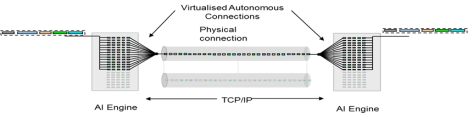
If you have existing FCIP routers you don’t need to rush out and switch over to IP replication with SANSlide, especially if your latency is reasonably low, but if you do have a high latency network it would be worth discussing your options with your local IBM Storwize expert. It might depend on the sophistication of your installed FCIP routers. Brocade for example suggests that the IBM SAN06B-R is pretty good at WAN optimization. So the graph below does not necessarily apply to all FCIP routers.
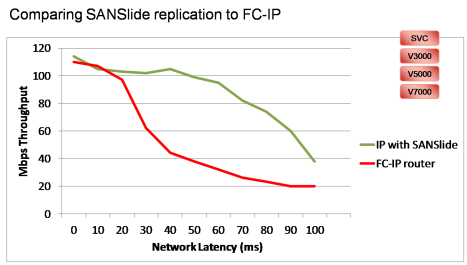
When you next compare long distance IBM Storwize replication to our competitors’ offerings, you might want to ask them to include the cost of WAN optimization appliances to get a full apples for apples comparison, or you might want to take into account that with IBM Storwize you will probably need a lot less bandwidth to achieve the same RPO.
Even when others do include products like Riverbed appliances with their offerings, SANSlide still has the advantage of being completely data-agnostic, so it doesn’t get confused or slow down when transmitting encrypted or compressed data like most other WAN optimization appliances do.
Free embedded SANSlide is only one of the cool new things in the IBM Storwize world. The folks in Hursley have been very busy. Check out Barry Whyte’s blog entry and the IBM Storwize product page if you haven’t done so already.
Filed under: SAN Volume Controller, Storwize V7000 | 11 Comments »
WAN optimization is not something that storage vendors traditionally put into their storage controllers. Storage replication traffic has to fend for itself out in the WAN world, and replication performance will usually suffer unless there are specific WAN optimization devices installed in the network.
For example, Netapp recommends Cisco WAAS as:
“an application acceleration and WAN optimization solution that allows storage managers to dramatically improve NetApp SnapMirror performance over the WAN.”
…because:
“…the rated throughput of high-bandwidth links cannot be fully utilized due to TCP behavior under conditions of high latency and high packet loss.”
EMC similarly endorses a range of WAN optimization products including those from Riverbed and Silver Peak.
Back in July, an IBM redpaper entitled “IBM Storwize V7000 and SANSlide Implementation” slipped quietly onto the IBM redbooks site. The redpaper tells us that:
“this combination of SANSlide and the Storwize V7000 system provides a powerful solution for clients who require efficient, IP-based replication over long distances.“
Bridegworks SANSlide provides WAN optimization, delivering much higher throughput on medium to high latency IP networks. This graph is from the redpaper:
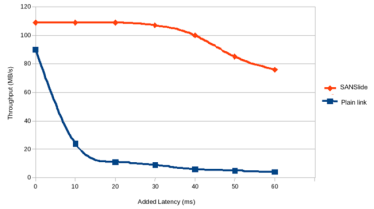
Bridgeworks also advises that:
“On the commercial front the company is expanding its presence with OEM partners and building a network of distributors and value-added partners both in its home market and around the world.“
Anyone interested in replication using any of the Storwize family (including SVC) should probably check out the redpaper, even if only as a little background reading.
Filed under: N Series, SAN Volume Controller, Storwize V7000 | 3 Comments »
This is a very brief update designed to help clarify a few things about IBM’s ProtecTIER dedup VTL solutions. The details of the software functions I will leave to the redbooks (see links below).
The dedup algorithm in ProtecTIER is HyperFactor, which detects recurring data in multiple backups. HyperFactor is unique in that it avoids the risk of data corruption due to hash collisions, a risk that is inherent in products based on hashing algorithms. HyperFactor uses a memory resident index, rather than disk-resident hash tables and one consequence of this is that ProtecTIER’s restore times are shorter than backup times, in contrast to other products where restore times are generally much longer.
The amount of space saved is mainly a function of the backup policies and retention periods, and the variance of the data between them, but in general HyperFactor can deliver slightly better dedup ratios than hash-based systems. The more full-backups retained on ProtecTIER, and the more intervening incremental backups, the more space that will be saved overall.
One of the key advantages of ProtecTIER is the ability to replicate deduped data in a many to many grid. ProtecTIER also supports SMB/CIFS and NFS access.
While Tivoli Storage Manager also includes many of the same capabilities as ProtecTIER, the latter will generally deliver higher performance dedup, by offloading the process to a dedicated system, leaving TSM or other backup software to concentrate on selecting and copying files.
For more information on the software functionality etc, please refer to these links:
In the past IBM has offered three models of ProtecTIER systems, two of which are now withdrawn, and a new one has since appeared.
There are a couple of rules of thumb I try to use when doing an initial quick glance sizing with the TS7650G with V7000 disk.
Those rules of thumb are not robust enough to be called a formal sizing, but they do give you a place to start in your thinking.
Filed under: ProtecTIER, Storwize V7000, Tivoli, XIV | Leave a comment »
The market is heating up and things are about to change.
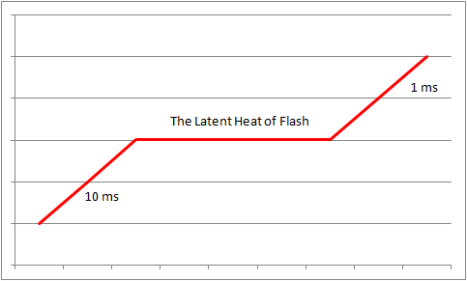
When budgets are tight the focus often goes onto the price per terabyte and that can mean storage that is just responsive enough to stop the application owners from beating down IT’s door to complain.
Over the years, application owners have been conditioned to run their apps on unbalanced infrastructures, usually with storage being the slowest part of the system. A 10 millisecond delay per online transaction has been generally considered acceptable for storage, while the app, the CPU, and the RAM all sit and wait. Not only that, but the way we size for transaction loads is often based on knowing the current peak transaction rate and response time and then allowing a percentage for headroom and growth. The sluggish old system is used to define the speed of the new one.
If we instead fully address the slowest link, improving it 10 fold, the apps run much faster, and as someone who often spends time each day waiting for IT systems to respond, I know that faster systems lead to better productivity.
In my last post I looked at the way some systems respond to the SPC-1 benchmark, often hitting 5 milliseconds read latency at less than half their rated IOPS. With the maturation of flash storage, the time is fast looming when 5 to 10 milliseconds will be considered unacceptable for online transaction processing, and sub-millisecond response will be expected for important apps.
At what point does the cost equation move away from being based on $/tolerable-TB to $/high-productivity-TB for mainstream transactional apps? It’s hard to quantify the productivity gain from a storage system that is 10 times more responsive. Is it worth double the $/TB? 50% more? 33% more?
An easy place to start is with transactional apps that need up to 20 TB of space, because that’s now relatively easy and cost-effective on Flash, but if you’re like Sprint Nextel and you need 150 TB of Flash then IBM can handle that as well using multiple 1u FlashSystem 820s behind SAN Volume Controller. Sprint Nextel are number one for customer service in their market and the purchase was designed to allow call-center operatives to respond rapidly to customer queries. They are visionary enough to see Flash as a competitive business advantage.
In my earlier post on Flash called Feeding The Hogs I focused on the traditional sweet spots for Flash, but what I’m hearing out in the world seems to be slightly different – the idea that every transactional app deserves Flash performance and a dawning realisation that there are real productivity gains to be had.
For more information on the IBM FlashSystem 820 check out IBM’s Flash product page.

Filed under: Flash, SAN Volume Controller | 2 Comments »
IBM has just published an SPC-1 benchmark result for XIV. The magic number is 180,020 low latency IOPS in a single rack. This part of my blog post was delayed by my waiting for the official SPC-1 published document so I could focus in on an aspect of SPC-1 that I find particularly interesting.
XIV has always been a work horse rather than a race horse, being fast enough, and beating other traditional systems by never going out of tune, but 180,020 is still a lot of IOPS in a single rack.
SPC-1 has been criticised occasionally as being a drive-centric benchmark, but it’s actually more true to observe that many modern disk systems are drive-centric (XIV is obviously not one of those). Things do change and there was a time in the early 2000’s when, as I recall, most disk systems were controller-bound, and as systems continue to evolve I would expect SPC-1 to continue to expose some architectural quirks, and some vendors will continue to avoid SPC-1 so that their quirks are not exposed.
For example, as some vendors try to scale their architectures, keeping latency low becomes a challenge, and SPC-1 reports give us a lot more detail than just the topline IOPS number if we care to look.
The SPC-1 rules allow average response times up to 30 milliseconds, but generally I would plan real-world solutions around an upper limit of 10 milliseconds average, and for tier1 systems you might sometimes even want to design for 5 milliseconds.
I find read latency interesting because not only does SPC-1 allow for a lot of variance, but different architectures do seem to give very different results. Write latency on the other hand seems to stay universally low right up until the end. Let’s use the SPC-1 reports to look at how some of these systems stack up to my 5 millisecond average read latency test:
DS8870 – this is my baseline as a low-latency, high-performance system
HP 3PAR V800
Pausing for a moment to compare DS8870 with 3PAR V800 you’d have to say DS8870 is clearly in a different class when it comes to read latency.
Hitachi VSP
Hitachi HUS-VM
Netapp FAS3270A
So how does XIV stack up?
And while I know that there are many ways to analyse and measure the value of things, it is interesting that the two large IBM disk systems seem to be the only ones that can keep read latency down below 5 ms when they are heavily loaded.
[SPC-1 capacity data removed on 130612 as it wasn’t adding anything, just clutter]
Update 130617: I have just found another comment from HP in my spam filter, pointing out that the DS8870 had 1,536 drives not 1,296. I will have to remember not to write in a such a rush next time. This post was really just an add-on to the more important first half of the post on the new XIV features, and was intended to celebrate the long-awaited SPC-1 result from the XIV team.
Filed under: DS8000, N Series, XIV | 9 Comments »
Recently announced XIV 11.3 adds several valuable new features…
Plus a Statement of Direction: “IBM intends to add support for self-service capacity provisioning of block storage, including IBM XIV Storage System, through use of IBM SmartCloud Storage Access.”
Sales Manual
Announcement
IBM has also just published an SPC-1 benchmark result for XIV. Because the document hasn’t quite made it to the SPC-1 web site, and because I wanted to focus on a particular detail of SPC-1 that I find interesting, I have split this blog post into two parts and I will delay the second part until the XIV result appears in public.
Meanwhile you can check out the new IBM XIV Performance Whitepaper here.
Filed under: XIV | 4 Comments »
When using the IBM System Storage Interoperation Center (SSIC) you need to submit!
I have recently come across two situations where technology combinations appeared to be supported, but there were significant caveats that were not mentioned until the ‘submit’ button was clicked.
The following example finds both of the caveats I have come across this week.
Choose FCoE (or FCoCEE as some refer to it) and VMware 5.1 and IBM Flex Systems, and then Cisco Nexus 5596UP. To simplify the number of options, also choose Midrange Disk and Storwize V7000 Host Attachment categories, and x440 Compute Node.
All good I was thinking – unsupported combinations are not selectable, so the fact that I could select these meant I was safe I thought…
What most people seem to neglect to do is hit the submit button. Submit can sometimes bring up a lot more detail including caveats…
Those with excellent vision might have noted this obscure comment associated with VMware 5.1…
A system call “fsync” may return error or timeout on VMWare guest OS’s and /or Vios LPAR OS’s
A self-funded chocolate fish will be awarded to the first person who can tell me what that actually means (yes I know what fsync is, but what does this caveat actually mean operationally?)
And possibly more important are the two identical comments made on the SAN/switch/networking lines
“Nexus TOR ( Top of Rack) Switch: Must be connected to Supported Cisco MDS Switches.”
i.e. Nexus is only supported with FCoE from the Flex server, if the V7000 itself is attached to a Cisco MDS at the back-end, even though I did not include MDS in the list of technologies I selected on the first page.
So the moral of the story is that you must hit the submit button on the SSIC if you want to get the full support picture.
And as a reminder that compatibility issues usually resolve themselves with time, here is a Dilbert cartoon from twenty one years ago. June 1992.

Filed under: Storwize V7000 | 3 Comments »
IBM has announced its new FlashSystem family following on from the acquisition of Texas Memory Systems (RAMSAN) late last year.
The first thing that interests me is where FlashSystem products are likely to play in 2013 and this graphic is intended to suggest some options. Over time the blue ‘candidate’ box is expected to stretch downwards.

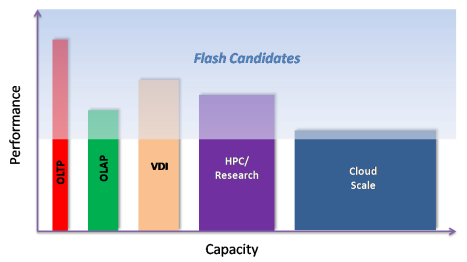
For the full IBM FlashSystem family you can check out the product page at http://www.ibm.com/storage/flash
Probably the most popular product will be the FlashSystem 820, they key characteristics of which are as follows:
Usable capacity options with RAID5
Latency
IOPS
Throughput
Physical
High Availability including 2-Dimensional RAID
For those who like to know how things plug together under the covers, the following three graphics take you through conceptual and physical layouts.
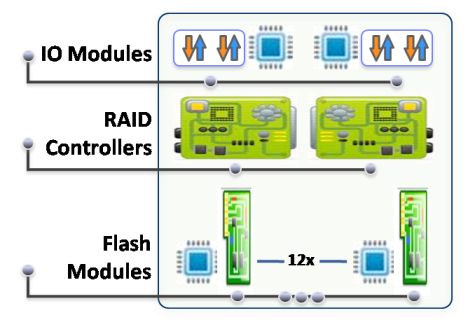
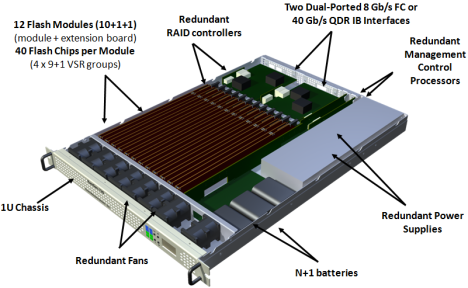
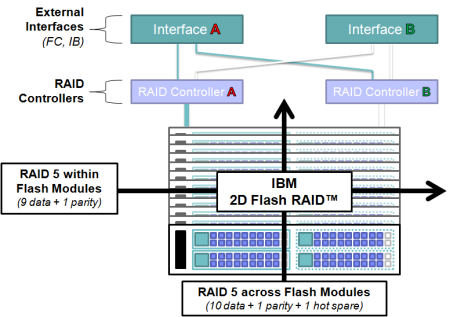
With IBM’s Variable Stripe RAID, if one die fails in a ten-chip stripe, only the failed die is bypassed, and then data is restriped across the remaining nine chips.
The IBM System Storage Interoperation Center is showing these as supported with IBM POWER and IBM System X (Intel) servers, including VMware 5.1 support.
The IBM FlashSystem is all about being fast and resilient. The system is based on FPGA and hardware logic so as to minimize latency. For those customers who want advanced software features like volume replication, snapshots (ironically called FlashCopy), thin provisioning, broader host support etc, the best way to achieve all of that is by deploying FlashSystem 820 behind a SAN Volume Controller (or Storwize V7000). This can also be used in conjunction with Easy Tier, with the SVC/V7000 automatically promoting hot blocks to the FlashSystem.
I’ll leave you with this customer quote:
“With some of the other solutions we tested, we poked and pried at them for weeks to get the performance where the vendors claimed it should be. With the RAMSAN we literally just turned it on and that’s all the performance tuning we did. It just worked out of the box.”
 —feeding the hogs—
Filed under: Flash, SAN Volume Controller, Storwize V7000, VMware | 6 Comments »
Not only is XIV Gen3 proving now to be just about the most robust thing you could ever wish to own, with significant improvements over Gen2, but IBM has just announced some interesting additional enhancements to Gen3, both new hardware and new version 11.2 firmware.
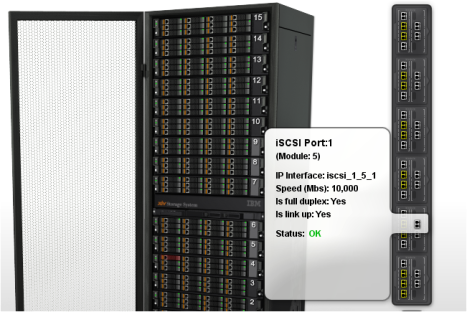
Some of the other cool things in 11.2 include:
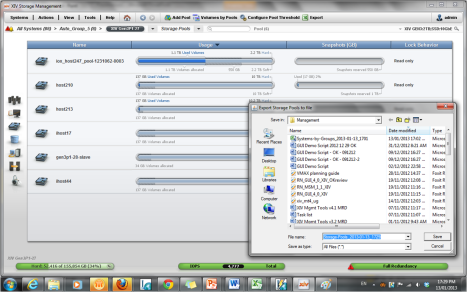
So in summary you could say the big points are:
If you haven’t thought about XIV for a while, it’s time you took another look.
Filed under: XIV | 4 Comments »
This week I’m on a summer camping holiday, so why not head over to Storagebod’s blog and read what The Bod has to say on the critical topic of storage complexity…
Filed under: XIV | Leave a comment »
Out there in IBM land the field technical and sales people are often given a guideline of between 5% and 10% of total NAS capacity being allocated for metadata on SONAS or Storwize V7000 Unified systems. I instinctively knew that 10% was too high, but like an obedient little cog in the machine I have been dutifully deducting 5% from the estimated nett capacity that I have sized for customers – but no more!
Being able to size metadata more accurately becomes especially important when a customer wants to place the metadata on SSDs so as to speed up file creation/deletion but more particularly inode scans associated with replication or anti-virus.
[updated slightly on 130721]
The theory of gpfs metadata sizing is explained here and the really short version is that in most cases you will be OK with allowing 1 KiB per file per copy of metadata, but the worst case metadata sizing (when using extended attributes, for things like HSM) should be 16.5 KiB * (filecount+directorycount) * 2 for gpfs HA mirroring.
e.g.
So why isn’t 5% a good assumption? What I am tending to see is that average file size on a general purpose NAS is around 5MB rather than the default assumption of 1MB or lower.
So it’s more important to have a conservative estimate of your filecount (and directory count) than it is to know your capacity.
The corollary for me is that budget conscious customers are more likely to be able to afford to buy enough SSDs to host their metadata, because we may be talking 1% rather than 5%.
Note: When designing SSD RAID sets for metadata, SONAS/V7000U/gpfs will want to mirror the metadata across two volumes, so ideally those volumes should be on different RAID sets.
Because of the big difference between the 16.5 * formula and the 5% to 10% guideline I’d be keen to get additional validation of the formula from other real users of Storwize V7000 Unified or SONAS (or maybe even general gpfs users). Let me know what you are seeing on your own systems out there. Thanks.
Filed under: SONAS, Storwize V7000 | 3 Comments »
What do you get at an IBM Systems Technical Symposium? Well for the event in Auckland, New Zealand November 13-15 I’ve tried to make the storage content as interesting as possible. If you’re interested in attending, send me an email at jkelly@nz.ibm.com and I will put you in contact with Jacell who can help you get registered. There is of course content from our server teams as well, but my focus has been on the storage content, planned as follows:

Erik Eyberg, who has just joined IBM in Houston from Texas Memory Systems following IBM’s recent acquisition of TMS, will be presenting “RAMSAN – The World’s Fastest Storage”. Where does IBM see RAMSAN fitting in and what is the future of flash? Check out RAMSAN on the web, on twitter, on facebook and on youtube.

Fresh from IBM Portugal and recently transferred to IBM Auckland we also welcome Joao Almeida who will deliver a topic that is sure to be one of the highlights, but unfortunately I can’t tell you what it is since the product hasn’t been announced yet (although if you click here you might get a clue).

Zivan Ori, head of XIV software development in Israel knows XIV at a very detailed level – possibly better than anyone, so come along and bring all your hardest questions! He will be here and presenting on:

John Sing will be flying in from IBM San Jose to demonstrate his versatility and expertise in all things to do with Business Continuance, presenting on:
Andrew Martin will come in from IBM’s Hursley development labs to give you the inside details you need on three very topical areas:
Senaka Meegama will be arriving from Sydney with three hot topics around VMware and FCoE:
Jacques Butcher is also coming over from Australia to provide the technical details you all crave on Tivoli storage management:
Maurice McCullough will join us from Atlanta, Georgia to speak on:
Sandy Leadbeater will be joining us from Wellington to cover:
I will be reprising my Sydney presentations with updates:
And finally, Mike McKenzie will be joining us from Brocade in Australia to give us the skinny on IBM/Brocade FCIP Router Implementation.
Filed under: DS8000, ProtecTIER, SAN Volume Controller, SONAS, Storwize V7000, Tivoli, VMware, XIV | 3 Comments »
Filed under: SAN Volume Controller, SONAS, Storwize V7000 | 4 Comments »
1920 was a big year with many famous events. Space does not permit me to mention them all, so please forgive me if your significant event of 1920 is left off the list: 
There is another famous 1920 event however – event code 1920 on IBM SAN Volume Controller and Storwize V7000 Global Mirror, and this event is much less well understood. A 1920 event code tells you that Global Mirror has just deliberately terminated one of the volume relationships you are replicating, in order to maintain good host application performance. It is not an error code as such, it is the result of automated intelligent monitoring and decision making by your Global Mirror system. I’ve been asked a couple of times why Global Mirror doesn’t automatically restart a relationship that has just terminated with a 1920 event code. Think about it. The system has just taken a considered decision to terminate the relationship, why would it then restart it? If you don’t care about host impact then you can set GM up so that it doesn’t terminate it in the first place, but don’t set it up to terminate on host impact and then blindly just restart it as soon as it does what you told it to do. 1920 is a form of congestion control. Congestion can be at any point in the end to end solution:
Before I explain how the system makes the decision to terminate, first let me summarize your options for avoiding 1920. That’s kind of back to front, but everyone wants to know how to avoid 1920 and not so many people really want to know the details of congestion control. Possible methods for avoiding 1920 are: (now includes a few updates in green and a few more added later in red)
So now lets move on to actually understanding the approach that SVC/V7000 takes to congestion control. First we need to understand streams. A GM partnership has 16 streams. All standalone volume relationships go into stream 0, consistency group 0 also goes into stream 0, consistency group 1 goes into stream 1, consistency group 2 goes into stream 2, etc, wrapping around as you get beyond 15. Immediately we realize that if we are replicating a lot of standalone volumes that it might make sense to create an empty cg0 so that we spread things around a little. Also, within each stream, each batch of writes must be processed in tag sequence order so having more streams (up to 16 anyway) reduces any potential for one write I/O to get caught in sequence behind a slower one. Also, each stream is sequence-tag-processed by one node. You could ideally have consistency groups in perfect multiples of the number of SVC/V7000 nodes/canisters, so as to spread the processing evenly across all nodes.OK, now let’s look at a few scenarios:
GMlinktolerance at 0 seconds
At a slightly more detailed level, an approximation of how the gmlinktolerance and gmmaxhostdelay are used together is as follows:
Hopefully this goes some way to explaining that event code 1920 is an intelligent parameter-driven means of minimizing host performance impact, it’s not a defect in GM. The parameters give you a lot of freedom to choose how you want to run things, you don’t have to stay with the defaults. 
Solving another kind of Global Mirror problem back in 1920.
Filed under: SAN Volume Controller, Storwize V7000 | 36 Comments »
Thanks to Patrick Lee for this example of Thin Provisioning and Real-time Compression…


Comprestimator will sample your actual data – i.e. provides real estimates, not just marketing promises.
Filed under: SAN Volume Controller, Storwize V7000 | 1 Comment »
[Note some additional info on RtC core usage added in blue 12th June 2012]
[Note also that testing shows that RtC works best with small block I/O e.g. databases, 4K, 8K, and has higher performance impact on larger I/O sizes. 13 March 2013]
Code level 6.4 has just been announced for IBM SAN Volume Controller and Storwize V7000 and among the new features is Realtime Compression (RtC) for primary data.
Comparing IBM RtC to post-process compression offerings from other vendors is a bit like comparing freshly squeezed orange juice to a box of reconstituted juice. IBM’s Realtime Compression is made fresh as you need it, but sooner or later the other vendors always rely on a big batch process. As it turns out, not only is reconstituted juice not very fresh, but neither is that box of not-from-concentrate juice. Only freshly squeezed is freshly squeezed. I found this quite interesting, so let’s digress for a moment…

What they don’t tell you about Not-from-Concentrate juice – Not-from-concentrate juice can be stored for up to a year. First they strip the juice of oxygen, so it doesn’t oxidize, but that also strips it of its flavour providing chemicals. Juice companies hire fragrance companies to engineer flavour packs to add back to the juice to try to make it taste fresh. Flavour packs aren’t listed as ingredients on the label because they are derived from orange essential oil. The packs added to juice earmarked for the US market contain a lot of ethyl butyrate. Mexicans and Brazilians favour the decanals (aldehydes), or terpene compounds such as valencine.
You can read this and a little more about the difference between freshly squeezed and boxed juice here. http://civileats.com/2009/05/06/freshly-squeezed-the-truth-about-orange-juice-in-boxes/
IBM’s Realtime Compression is based on the Random Access Compression Engine (RACE) that IBM acquired a couple of years ago. The unique offering here is that RtC is designed to work with primary data, not just archival data. It is, as the name implies, completely real-time for both reads and writes. A compressed volume is just another volume type, similar to a thin provisioned volume and new metrics are provided to monitor the performance overhead of the compression.

The system will report the volume size as seen by the host, the thin provisioned space assuming there was no compression, and the real space used nett of thin provisioning and compression savings. Also presented is a quick bubble showing savings from compression across the whole system. Space saving estimates are as per the following table:

Capacity Magic 5.7.4 now supports compression and caters for the variety of data types. Disk Magic will also be updated to take account of compression and a new redbook will be available shortly to cover it as well.
Most performance modelling I have seen on Storwize V7000 up until now shows controllers that are less than 10% busy, which is a good thing as RtC will use [up to] 3 out of 4 (Storwize V7000, SVC CF8) or 4 out of 6 (SVC CG8) CPU cores and 2GB of RAM. The GUI and other services still get to use the cores that RtC ‘owns’, but non-compressed I/O gets routed to the other cores. There has always been some hard-wiring of SVC cores, but we just haven’t talked about it before. The GUI can’t run on more than 2 out of 6 cores for example, and non-compressed I/O will never use more than 4 cores, that’s the way it’s always been, and RtC doesn’t change that.
Anyway, if you are more than 20% CPU busy on your current SVC or Storwize V7000 systems [extremely unlikely as SVC is a very low-CPU consumption architecture] the best way to deploy RtC would be to add another I/O group to your clustered system. I expect future hardware enhancements will see more cores per system. Storwize V7000 is currently a single 4 core processor per node, so there’s plenty of scope for increase there.
RtC is a licensed feature – licensed per enclosure on Storwize V7000 and per TB on SVC. In the coming weeks we will see how the pricing works out and that will determine the practical limits on the range of use cases. [Looks like it’s pretty cost-effective from what I’ve seen so far].
RACE sits below the copy services in the stack, so they all get to take advantage of the compression. RACE is integrated into the Thin Provisioning layer of the code so all of the usual Thin Provisioning capabilities like auto-expand are supported.

When you add a volume mirror you can choose to add the mirror as a compressed volume, which will be very useful for converting your existing volumes.

IBM’s patented approach to compression is quite different from the other vendors’.
Fixed Input : Variable Output – Netapp takes 32K chunks and spits them into some number of 4K compressed chunks with some amount of padding, but Netapp block re-writes are not compressed in real-time so the volume will grow as it’s used. Most workloads need to be run as post-process compression and you will need to be very careful of the interactions with Snapshots because of the way Netapp stores snaps inside the original volume.
Variable Input : Fixed Output – IBM’s RtC is designed for use on primary data. It takes a large variable input stream e.g. up to 160K in some cases (so has a larger scope to look for a repeated bit stream = better compression rates) and spits the compressed data out into a 32K fully allocated compressed chunk. Writing out a fixed 32K with no padding is more efficient and a key benefit is that all re-writes continue to be compressed. This is a completely real-time solution.
Note that RtC is not yet available on Storwize V7000 Unified.

Filed under: SAN Volume Controller, Storwize V7000 | 12 Comments »
I’m currently in Los Gatos, California for a month learning all about the inner workings of SAN Volume Controller and Storwize V7000 copy services. I have my next storage post planned for June 4th or 5th, and once the new SVC and Storwize V7000 Copy Services Redbook is published I might also post some personal highlights from that as well.
Meanwhile I’m adjusting to life in Silicon Valley – lots of sun, lots of (polite) people, lots of cars, lots of dogs, not many adverbs (adjectives are preferred).
This morning I took a walk up to St Joseph’s Hill above Los Gatos.

And this afternoon I visited Hakone Japanese garden in Saratoga.

Hot tip for any New Zealanders or Australians travelling to the Bay area: Cost Plus World Market sells Vegemite.
Filed under: SAN Volume Controller, Storwize V7000, The Nature of Man | Leave a comment »
I’ve been too busy to blog recently, but I have just paused long enough to add a significant update regarding IBM Storwize V7000 drive rebuild times to my earlier post on RAID rebuild times. Rather than start a new post I thought it best to keep it all together in the one place, so I have added it as point 7 in “Hu’s on first, Tony’s on second, I Don’t Know’s on third”
Filed under: Storwize V7000 | Leave a comment »
IBM XIV 11.1 has just announced support for SSD Flash Cache. The title of this post is taken from DC Comics Flash Annual Vol 2 #3 and it’s all about running fast. Not everyone is going to need the XIV Flash Cache performance kicker, but if you want a couple of hundred TiB of massively fast storage in a single rack then XIV Gen3 with distributed Flash Cache is your dream come true.
To deliver this amount of capacity and extreme performance in a single rack with the industry’s best ease of use is a real game changer. You need never buy an old style multi-frame box with hundreds of 15K disk drives in it ever again.

The XIV SSD Flash Cache implementation has some at-first-glance conceptual similarities to Netapp’s FlashCache. Both XIV and Netapp are unusual in that they are natively write-optimized architectures (albeit massively different architectures) so using Flash Cache to optimize read performance gives a disproportionately good return on investment compared to other vendors’ products. But there the similarity ends.
XIV is a grid so there are 15 SSDs operating independently rather than everything being funnelled to and from a centralised cache.
…so this diagram is only one module out of 15 in each system.

The SSDs in XIV Flash Cache are at least 400GB each, but I won’t promise which exact drive since they may be multi-sourced.
IBM does some things differently courtesy of IBM Research, when it comes to wear-levelling tricks, plus some innovative thinking from the XIV team on caching. You have to be careful how you use SSDs or their efficiency and performance can degrade with use. SSD drive manufacturers have some tricks to try to minimize that, but IBM goes one step further than other vendors on that front. XIV buffers 512KB chunks in cache and then writes them sequentially onto SSD in a circular log format. Thereby avoiding random writes to the SSDs, which is the main cause of degradation on other vendors’ implementations.
15 Flash Caches – not a centralised funnelled cache

You can add Flash Caches non-disruptively to any XIV Gen3 system. XIV will bypass Flash Cache for sequential reads, and you can set specific volumes to bypass Flash Cache if you want to. This can be used to complement the per-host QoS capabilities of XIV, but we usually suggest letting the system work out how best to use Flash Cache in most cases.
Flash Cache data is persistent across both hot and cold reboot, so there is no need to wait for the cache to fill again before it’s effective.
The SSDs now make an appearance throughout the GUI, including in the performance tools where you can see the read-hit split between SSD and Memory.

There are many other feature enhancements in 11.1 like mirroring between Gen2 and Gen3 XIVs. Check out the XIV product page for more details, including the ability to see 9 XIVs on a screen and manage up to 81 XIVs from one console. This is starting to become important as we now have 59 customers who have more than 1PB of XIV storage (nett usable) and 16 of them have more than 2PB (nett usable). Also, I’m a Blackberry man myself (courtesy of IBM) but if you’re an Apple fanboy you might like the new iPhone 4S XIV Mobile Dashboard app (to add to the iPad app already released).
From what I have seen, the performance improvement from Flash Cache is more dramatic on XIV than on other disk systems. The IOPS kick can be 3x on a 70/30/50 style OLTP, and in some extreme cases could go as high as 6x. Response times are also dramatically improved. XIV without Flash Cache has really good write performance (remember the screenshot from July last year showing almost 500,000 IOPS 4KB write hits at around 1 second latency?) and now with Flash Cache the read performance gets to share in that awesomeness as well : )
But, bragging rights aside, I like to be a little conservative with real-world performance claims. This graph shows 2x IOPS for an internally tested CRM and Financial ERP database workload, 70/30 read/write with an 8KB I/O size – the most conservative of the internal test results.

Back in October I speculated that we might see an industry-standard OLTP style benchmark published by the XIV team once Flash Cache was available. I’m still hoping that will happen. It would be interesting to see how it stacks up. It seems like everyone’s doing Flash these days.
And now one more Big Bang Theory ‘Flash’ link just for fun…

Filed under: XIV | Leave a comment »
Many years ago a Glaswegian friend of mine quoted someone as saying that the 1981 anti-apartheid protests in New Zealand (South African rugby tour) showed that New Zealand was not just a floating Surrey as some had previously suspected. While the Surrey reference might be lost on those not from England, I can tell you there are some distinct cultural and language differences between NZ and England.
For example, there was a (not very good) punk band called ‘Rooter’ back in the late 1970’s in New Zealand. They ended up having to change their name to The Terrorways because ‘Rooter’ was considered too offensive by the managers of many pubs and clubs.
I guess that’s why in NZ we always pronounce ‘router’ to rhyme with ‘shouter’ even though we pronounce ‘route’ to rhyme with ‘shoot’. We’re kind of stuck in the middle between British and American English.
Pronunciation issues aside however, FCIP routers are a highly reliable way to connect fabrics and allow replication over the WAN between fibre channel disk systems. The price of FCIP routers seems to have halved over the last year or so, which is handy and live replicated DR sites have become much more commonplace in the midrange space in the last couple of years.
Apart from the WAN itself (which is the source of most replication problems) there are a couple of other things that it’s good to be aware of when assembling a design and bill of materials for FCIP routers.

The reason for this is that the routers and the switches all run the same FabricOS and there is a small potential for an error to be propagated across fabrics, even though Integrated Routing supposedly isolates the fabrics. This is something that Alexis tells me he has explored in detail with Brocade and they too recommend this as a point of best practice. If you already have dual-fabric connected single routers then I’m not sure the risk is high enough to warrant a reconfiguration, but if you’re starting from scratch you should not connect them all up. This would also apply if you are using Cisco MDS922i and MDS91xx for example, as all switches and routers would be running NXOS and the same potential for error propagation exists.
Filed under: DS8000, SAN Volume Controller, Storwize V7000 | 15 Comments »
IBM storage architects and IBM Business Partners are encouraged to use Disk Magic to model performance when recommending disk systems to meet a customer requirement. Recently v9.1 of Disk magic was released and it listed nine changes from v9. This little gem was one of them:
“The Easy Tier predefined Skew Levels have been updated based on recent measurements.”
Knowing that sometimes low-key mentions like this can actually be quite significant, I thought I’d check it out.
It turns out that v9 had three settings
While v9.1 has
If I take a model that I did recently for Storwize V7000 customer:
The v9 predictions were:
I have generally used medium skew (3.5) when doing general sizing, but the help section in Disk Magic now says “In order to get a realistic prediction, we recommend using the high skew (14) option for most typical environments. Use the intermediate skew level (7) for a more conservative sizing.”
The v9.1 predictions are now:
So what we can see from this is that the performance hasn’t changed for a given skew, but what was previously considered heavy skew is now classed as intermediate. It seems that field feedback is that I/Os are more heavily skewed towards a fairly small working set as a percentage of the total data. Easy Tier is therefore generally more effective than we had bargained on. So apparently I have been under-estimating Easy Tier by a considerable margin (the difference between 13,000 IOPS and 28,000 IOPS in this particular customer example).
The Disk Magic help also provides this graph to show how the skew relates to real life. “In this chart the intermediate skew curve (the middle one) indicates that for a fast tier capacity of 20%, Easy Tier would move 79% of the Workload (I/Os) to the fast tier.”

For more reading on Easy Tier see the following:
Filed under: DS8000, SAN Volume Controller, Storwize V7000 | 1 Comment »
This post started life earlier this year as a post on the death of RAID-5 being signaled by the arrival of 3TB drives. The point being that you can’t afford to be exposed to a second drive failure for 2 or 3 whole days especially given the stress those drives are under during that rebuild period.
But the more I thought about RAID rebuild times the more I realized how little I actually knew about it and how little most other people know about it. I realized that what I knew was based a little too much on snippets of data, unreliable sources and too many assumptions and extrapolations. Everybody thinks they know something about disk rebuilds, but most people don’t really know much about it at all and thinking you know something is worse than knowing you don’t.
In reading this so far it started to remind me of an old Abbot and Costello sketch.

Anyway you’d think that the folks who should know the real answers might be operational IT staff who watch rebuilds nervously to make sure their systems stay up, and maybe vendor lab staff who you would think might get the time and resources to test these things, but I have found it surprisingly hard to find any systematic information.
I plan to add to this post as information comes to hand (new content in green) but let’s examine what I have been able to find so far:
1. The IBM N Series MS Exchange 2007 best practices whitepaper mentions a RAID-DP (RAID6) rebuild of a 146GB 15KRPM drive in a 14+2 array taking 90 minutes (best case).
Netapp points out that there are many variables to consider, including the setting of raid.reconstruct.perf_impact at either low, medium or high, and they warn that a single reconstruction effectively doubles the I/O occurring on the stack/loop, which becomes a problem when the baseline workload is more than 50%.
Netapp also says that rebuild times of 10-15 hours are normal for 500GB drives, and 10-30 hours for 1TB drives.
2. The IBM DS5000 Redpiece “Considerations for RAID-6 Availability and Format/Rebuild Performance on the DS5000” shows the following results for array rebuild times on 300GB drives as the arrays get bigger:
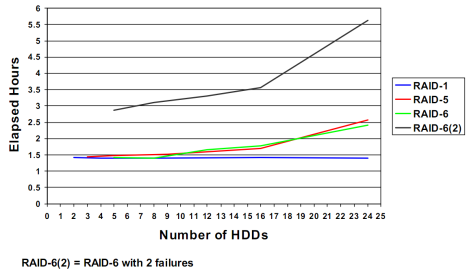
I’m not sure how we project this onto larger drive sizes without more lab data. In these two examples there was little difference between N Series 14+2 146GB and DS5000 14+2 300GB, but common belief is that rebuild times rise proportionally to drive size. The 2008 Hitachi whitepaper “Why Growing Businesses Need RAID 6 Storage” however, mentions a minimum of 24 hours for a rebuild of an array with just 11 x 1TB drives in it on an otherwise idle disk system.
What both IBM and Netapp seem to advise is that rebuild time is fairly flat until you get above 16 drives, although Netapp seems to be increasingly comfortable with larger RAID sets as well.
3. A 2008 post from Tony Pearson suggests that “In a typical RAID environment, say 7+P RAID-5, you might have to read 7 drives to rebuild one drive, and in the case of a 14+2 RAID-6, reading 15 drives to rebuild one drive. It turns out the performance bottleneck is the one drive to write, and today’s systems can rebuild faster Fibre Channel (FC) drives at about 50-55 MB/sec, and slower ATA disk at around 40-42 MB/sec. At these rates, a 750GB SATA rebuild would take at least 5 hours.”
Extrapolating from that would suggest that a RAID5 1TB rebuild is going to take at least 9 hours, 2TB 18 hours, and 3TB 27 hours. The Hitachi whitepaper figure seems to be a high outlier, perhaps dependent on something specific to the Hitachi USP architecture.
Tony does point out that his explanation is a deliberate over-simplification for the purposes of accessibility, perhaps that’s why it doesn’t explain why there might be step increases in drive rebuild times at 8 and 16 drives.
4. The IBM DS8000 Performance Monitoring and Tuning redbook states “RAID 6 rebuild times are close to RAID 5 rebuild times (for the same size disk drive modules (DDMs)), because rebuild times are primarily limited by the achievable write throughput to the spare disk during data reconstruction.” and also “For array rebuilds, RAID 5, RAID 6, and RAID 10 require approximately the same elapsed time, although RAID 5 and RAID 6 require significantly more disk operations and therefore are more likely to impact other disk activity on the same disk array.”
The below image just came to hand. It shows how the new predictive rebuilds feature on DS8000 can reduce rebuild times. Netapp do a similar thing I believe. Interesting that it does show a much higher rebuild rate than the 50MB/sec that is usually talked about.
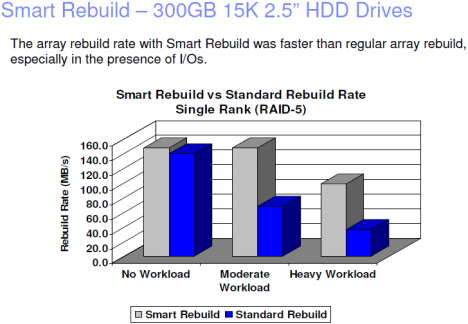
5. The EMC whitepaper “The Effect of Priorities on LUN Management Operations” focuses on the effect of assigned priority as one would expect, but is nonetheless very useful in helping to understanding generic rebuild times (although it does contain a strange assertion that SATA drives rebuild faster than 10KRPM drives, which I assume must be a tranposition error). Anyway, the doc broadly reinforces the data from IBM and Netapp, including this table.

This seems to show that increase in rebuild times is more linear as the RAID sets get bigger, as compared to IBM’s data which showed steps at 8 and 16. One person with CX4 experience reported to me that you’d be lucky to get close to 30MB/sec on a RAID5 rebuild on a typical working system and when a vault drive is rebuilding with priority set to ASAP not much else gets done on the system at all. It remains unclear to me how much of the vendor variation I am seeing is due to reporting differences and detail levels versus architectural differences.
6. IBM SONAS 1.3 reports a rebuild time of only 9.8 hours for a 3TB drive RAID6 8+2 on an idle system, and 6.1 hours on a 2TB drive (down from 12 hours in SONAS 1.2). This change from 12 hours down to 6.1 comes simply from a code update, so I guess this highlights that not all constraints on rebuild are physical or vendor-generic.
7. March 2012: I just found this pic from the IBM Advanced Technical Skills team in the US. This gives me the clearest measure yet of rebuild times on IBM’s Storwize V7000. Immediately obvious is that the Nearline drive rebuild times stretch out a lot when the target rebuild rate is limited so as to reduce host I/O impact, but the SAS and SSD drive rebuild times are pretty impressive. The table also came with an comment estimating that 600GB SAS drives would take twice the rebuild time of the 300GB SAS drives shown.

~
In 2006 Hu Yoshida posted that “it is time to replace 20 year old RAID architectures with something that does not impact I/O as much as it does today with our larger capacity disks. This is a challenge for our developers and researchers in Hitachi.”
I haven’t seen any sign of that from Hitachi, but IBM’s XIV RAID-X system is perhaps the kind of thing he was contemplating. RAID-X achieves re-protection rates of more than 1TB of actual data per hour and there is no real reason why other disk systems couldn’t implement the scattered RAID-X approach that XIV uses to bring a large number of drives into play on data rebuilds, where protection is about making another copy of data blocks as quickly as possible, not about drive substitution.
So that’s about as much as I know about RAID rebuilds. Please feel free to send me your own rebuild experiences and measurements if you have any.
Filed under: N Series, Storwize V7000, XIV | 9 Comments »
Big Data can take a variety of forms but what better way to get a feeling for the performance of a big data storage system than using a standard audited benchmark to measure large file processing, large query processing, and video streaming.
From the www.storageperformance.org website:
“SPC-2 consists of three distinct workloads designed to demonstrate the performance of a storage subsystem during… large-scale, sequential movement of data…
The Storage Performance Council also recently published its first SPC-2E benchmark result. “The SPC-2/E benchmark extension consists of the complete set of SPC-2 performance measurement and reporting plus the measurement and reporting of energy use.”
It uses the same performance test as the SPC-2 so the results can be compared. It does look as though only IBM and Oracle are publishing SPC-2 numbers these days however and the IBM DS5300 and DS5020 are the same LSI OEM boxes as the Oracle 6780 and 6180, so that doesn’t really add a lot to the mix. HP and HDS seem to have fled some time ago, and although Fujitsu and Texas Memory do publish, I have never encountered either of those systems out in the market. So the SPC-2 right now is mainly a way to compare sequential performance among IBM systems.

XIV is certainly interesting, because in its Generation 2 format it was never marketed as a box for sequential or single-threaded workloads. XIV Gen2 was a box for random workloads, and the more random and mixed the workload the better it seemed to be. With XIV Generation 3 however we have a system that is seen to be great with sequential workloads, especially Large File Processing, although not quite so strong for Video on Demand.
The distinguishing characteristic of LFP is that it is a read/write workload, while the others appear to be read-only. XIV’s strong write performance comes through on the LFP benchmark.

Drilling down one layer deeper we can look at the components that make up Large File Processing. Sub-results are reported for reads, writes, and mixed read/write, as well as for 256 KiB and 1,024 KiB I/O sizes in each category.

So what we see is that XIV is actually slightly faster than DS8800 on the write workloads, but falls off a little when the read percentage of the I/O mix is higher.
Filed under: DS8000, Storwize V7000, XIV | 3 Comments »
The new Storwize V7000 Unified (Storwize V7000U) enhancements mean that IBM’s common NAS software stack (first seen in SONAS) for CIFS/NFS/FTP/HTTP/SCP is now deployed into the midrange.
Translating that into simpler language:
IBM is now doing its own mid-range NAS/Block Unified disk systems.
Anyone who has followed the SONAS product (and my posts on said product) will be familiar with the functions of IBM’s common NAS software stack, but the heart of the value is the file-based ILM capability, now essentially being referred to as the Active Cloud Engine.
The following defining image of the Active Cloud Engine is taken from an IBM presentation:
 What the file migration capability does is place files onto a specific tier of disk depending on the user-defined policy.
e.g. when disk tier1 hits 80% full, move any files that have not been accessed for more than 40 days to tier2.
Importantly these files keep their original place in the directory tree.
The file-based disk to disk migration is built-in, and does not require any layered products or additional licensing.
Files can also be migrated off to tape as required without losing their place in the same directory tree, using HSM which is licensed separately.
Another important feature that IBM’s competitors don’t have is that although there are two file services modules in every Storwize V7000U operating in active/active configuration they present a single namespace to the users e.g. all of the storage can be presented to a single S: drive.
And the final key feature I wanted to mention was the unified management interface for file and block services, another feature which some of our competitors lack.

Naturally there are many other features of the Storwize V7000U, most of which you’ll find mentioned on the standard Storwize V7000 product page and the Storwize V7000 Unified infocenter.
Today IBM also announces SONAS 1.3, as well as a 243TB XIV model based on 3TB drives, SVC split cluster up to 300Kms, Block replication compatibility between SVC and Storwize V7000, Snapshot-based replication option for SVC and Storwize V7000 and an assortment of Tivoli software enhancements.
Check out IBM bloggers Tony Pearson, Barry Whyte and Rawley Burbridge who have more details.
Meanwhile talking about Active Cloud Engine as a kind of robot reminded me of another robot. Although I have never really been at ease with the ugly competitiveness of capitalism, I do hate losing, so perhaps this is a more apt image to show how we see the Active Cloud Engine ‘robot’ stacking up against the competition.

And here are some other Killer Robots:
The Big Bang Theory “The Killer Robot”
Jamie Hyneman’s (MythBuster) robot Blendo in action against DoMore
Filed under: SAN Volume Controller, SONAS, Storwize V7000 | 4 Comments »
SAN Volume Controller
Late in 2010, Netapp quietly announced they were not planning to support V Series (and by extension IBM N Series NAS Gateways) to be used with any recent version of IBM’s SAN Volume Controller.
This was discussed more fully on the Netapp communities forum (you’ll need to create a login) and the reason given was insufficient sales revenue to justify on-going support.
This is to some extent generically true for all N Series NAS gateways. For example, if all you need is basic CIFS access to your disk storage, most of the spend still goes on the disk and the SVC licensing, not on the N Series gateway. This is partly a result of the way Netapp prices their systems – the package of the head units and base software (including the first protocol) is relatively cheap, while the drives and optional software features are relatively expensive.

Netapp however did not withdraw support for V Series NAS gateways on XIV or DS8000, and nor do they seem to have any intention to, as best I can tell, considering that support to be core capability for V Series NAS Gateways.
I also note that Netapp occasionally tries to position V Series gateways as a kind of SVC-lite, to virtualize other disk systems for block I/O access.
Anyway, it was interesting that what IBM announced was a little different to what Netapp announced “NetApp & N Series Gateway support is available with SVC 6.2.x for selected configurations via RPQ [case-by-case lab approval] only”
Storwize V7000
What made this all a bit trickier was IBM’s announcement of the Storwize V7000 as its new premier midrange disk system.
Soon after on the Netapp communities forum it was stated that there was a “joint decision” between Netapp and IBM that there would be no V Series NAS gateway support and no PVRs [Netapp one-off lab support] for Storwize V7000 either.
Now the Storwize V7000 disk system, which is projected to have sold close to 5,000 systems in its first 12 months, shares the same code-base and features as SVC (including the ability to virtualize other disk systems). So think about that for a moment, that’s two products and only one set of testing and interface support – that sounds like the support ROI just improved, so maybe you’d think that the original ROI objection might have faded away at this point? It appears not.
Anyway, once again, what IBM announced was a little different to the Netapp statement “NetApp & N Series Gateway support is available with IBM Storwize V7000 6.2.x for selected configurations via RPQ only“.
Whither from here?
The good news is that IBM’s SONAS gateways support XIV and SVC (and other storage behind SVC) and SONAS delivers some great features that N Series doesn’t have (such as file-based ILM to disk or tape tiers) so SVC is pretty well catered for when it comes to NAS gateway funtionality.
When it comes to Storwize V7000 the solution is a bit trickier. SONAS is a scale-out system designed to cater for 100’s of TBs up to 14 PBs. That’s not an ideal fit for the midrange Storwize V7000 market. So the Netapp gateway/V-series announcement has created potential difficulties for IBM’s midrange NAS gateway portfolio… hence the title of this blog post.
Filed under: DS8000, N Series, SAN Volume Controller, SONAS, Storwize V7000, XIV | 2 Comments »
HSM is essentially a way to push disk files to lower tiers, mainly tape, while leaving behind a stub-file on disk, so that the file maintains it’s accessibility and its place in the directory tree.

I say tape because there are other ways to do it between disk tiers that don’t involve stub files. e.g. IBM’s SONAS uses it’s built-in virtualization capabilites to move files between disk tiers, without changing their place in the directory tree, but SONAS can also use Tivoli Space Management to migrate those files to tape using HSM.
HSM started life as DFHSM [DFSMShsm] on IBM mainframe and I use it most weeks in that context when I log into one of IBM’s mainframe apps and wait a minute or two for it to recall my database query files to disk. That’s some pretty aggressive archiving that’s going on, and yes it’s bullet-proof.
I know of a couple of instances in the early 2000’s when companies got excited about file-based Information Lifecycle Management, and implemented HSM products (not IBM ones) on Microsoft Windows. Both of those companies removed HSM not long after, having experienced blue screens of death and long delays. The software was flaky and the migration policies probably not well thought out (probably too aggressive given the maturity of open systems HSM at the time). Being conservative, IBM came a little late to the game with Open Systems HSM, which is not necessarily a bad thing, but when it came, it came to kick butt.
Tivoli Space Management is a pretty cool product. Rock solid and feature rich. It runs on *NIX and our customers rely on it for some pretty heavy-duty workloads, migrating and recalling files to and from tape at high speed. I know one customer with hundreds of terabytes under HSM control in this way. TSM HSM for Windows is another slightly less sophisticated product in the family, but one I’m not so familiar with.
One could argue that Space Management has been limited as a product by its running on *NIX operating systems only, when most file servers out in the world were either Windows or Netapp, but things are changing. HSM is most valuable in really large file envionments – yes, the proverbial BIG DATA, and BIG DATA is not typically running on either Windows or Netapp. IBM’s SONAS for example, scalable to 14 Petabytes of files, is an ideal place for BIG DATA, and hence an ideal place for HSM.
As luck would have it, IBM has integrated Space Management into SONAS. SONAS will feed out as much CIFS, NFS, FTP, HTTP etc as you want, and if you install a Space Management server it will also provide easy integration to HSM policies that will migrate and recall data from tape based on any number of file attributes, but I guess most typically ‘time last accessed’ and file size.
Tape is by far the cheapest way to store large amounts of data, the trick is in making the data easily accessible. I have in the past tried to architect HSM solutions for both Netapp and Windows environments, and both times it ended up in the too hard basket, but with SONAS, HSM is easy. SONAS is going to be a really big product for IBM over the coming years as the BIG DATA explosion takes hold, and the ability to really easily integrate HSM to tape, from terabytes to petabytes, and have it perform so solidly is a feature of SONAS that I really like.
Tape has many uses…

Filed under: SONAS, Tivoli | 1 Comment »
Working in a sales-oriented part of IBM, it’s interesting for me to be occasionally on the buying side of the equation and note my own reactions to different criteria, brands and situations.
Recently I bought a second-hand X-Type Jaguar 2.1L SE (Singapore import), after considering a BMW 320i 2.2L E46 and a Nissan Skyline V35 2.5L (that’s Infiniti G35 for our American friends). My criteria setting out was for a compact 2005+ 6-cylinder vehicle with low mileage. I do about 26,000 Kms a year and want to keep the car for 3-5 years and my experience suggests a 6-cyl is good for 200,000 Kms.
I can imagine an IT buyer setting out to buy a storage solution with criteria that might parallel this.

Fuel consumption (think elements of TCO) on the Jag and the beamer were similar, with the Skyline being a bit better even though it is a larger vehicle with a larger engine. Also there are a lot of V35 Skylines around, quite a lot of BMW 320i’s around, and not quite so many X-type Jags around.
How much weight do you give to leadership in your market? How much weight do you give to TCO over purchase price? Both of these turned out to be considerations for me, but not big enough to swing the final decision.
I did my homework on the technology, and the reputation, and the prices and availability of each. I looked briefly also at Nissan Maxima/Teana, and Holden/Chevrolet Epica (Daewoo Tosca) but they were both a bit bland for my taste [in the words of the Suburban Reptiles “Told what to do by the Megaton, so we may as well die while we’re having fun”].
So I’m relating this to how an IT buyer might go about drawing up a shortlist of vendors. A lot of buyers want a bit of sizzle with their sausage.

My personal preference was for the Skyline, but the Jag I finally test drove was very tidy, and my wife loved the leather seats, and maybe I was influenced by memories of riding in my uncle’s XJ6 as a child. Also the Skyline I wanted was going to take another week to arrive, and I’m not really a patient guy. I had sold my 2005 Suzuki Swift Sport within two days of deciding to sell it and I was ready to buy again. Also worth noting is that the Skyline was my wife’s third choice of the three, partly because it was the biggest of the three. The Skyline’s Nissan 350z technology and it’s name link to the GTR Skylines that cleaned out the big V8’s back in ’91 & ’92 at Bathurst also make it more of a boys’ car I suppose.
So more parallels with my mythical IT buyer taking the opinions of other influencers and circumstances into account, and do you take into account what’s around the corner, or just what’s immediately on the table?
The BMW was there mainly out of curiosity – I have always associated BMW’s with people who wanted to impress others with their success : ) e.g. Real Estate Agents. Now I know that isn’t fair on either BMW or Real Estate Agents, which is why I wanted to include the beamer in my eval, but the prejudice is still embedded somewhere deep in my mind.
I know that some IT buyers carry unfair prejudices about storage companies also, and sometimes include vendors or products on their shortlist more out of curiosity than out of any real intention of buying.
One friend warned me about Jaguar unreliability, but I did my homework. X-type (with it’s Ford Mondeo heritage) seemed a pretty safe choice. I wanted to get an AA check done, but I realised that would be a hassle and would add days to the purchase, so instead I negotiated 3 years mechanical insurance into the purchase. So either I get points for being flexible about the best way to manage risk, or I lose points for quickly abandoning my original plan when it started to look inconvenient.

As it turned out the Skyline and the Jag were the same price, and the beamer was about 15% more, which made it easy to eliminate the beamer, seeing as I’d never really wanted it in the first place. Its one nice feature was that it was the smallest of the 3 vehicles, so technically it was the best fit for my core criteria. Also the Jag I wanted was pulled from sale, and I had to go to a 2004 model, which was older than my starting criterion, but it was the best example of an X-type I could find so I made an exception for it.
I am sure IT buyers sometimes re-define their business requirements to accommodate their desires or the convenience of the moment.
All in all I’m happy with my X-type Jag. Slightly concerned about fuel consumption, but surprised how many X-types I have seen in the last two days. I’ve also been surprised that most people over-estimate the value of the car. It probably only cost me 15% more up-front than buying a much lower spec 4 cylinder Toyota Corolla for example, which in my book is definitely a sausage without any sizzle.
My concrete contractor brother did call me a wanker when he saw the Jag (again probably based on an instant over-estimation of what I’d paid) but I didn’t feel like a wanker. Strangely I knew I would have felt like a wanker if I’d gone with the beamer though (no slur intended on other beamer owners) and I probably would have felt cooler if I’d gone with the Skyline, but the X-type Jag won the day.
So the winner was not the cheapest, or the coolest, or the best technical fit, but on balance the most convenient, the easiest to buy, and the best overall fit.
Is that how people buy IT storage solutions?
Filed under: The Nature of Man | 1 Comment »
I was recently mulling over some examples of OEM co-op-etition in our industry:
So what we learn from co-op-etition is that it’s designed to benefit both parties and their customers, but if it works it sometimes leads to changes in the dynamics between the three. If the relationship lasts only a couple of years it may be a sign that the dynamics weren’t right in the first place and the setup and tear-down costs are unlikely to have been recovered. If it lasts 5 or 10 years then I think you’d have to consider that a big success.
The IBM OEM agreement with Netapp dates from 2005 and continues to benefit both parties. IBM has provided Netapp with entry into large enterprises around the world and contributes about 10% of Netapp’s revenues. Netapp has leveraged IBM’s channel and benefited from the credibility endorsement. These days Netapp is on a roll fueled by VMware but they weren’t such a high profile contender back in 2005. One long-term benefit to IBM is that it now has a worldwide workforce experienced with NAS.
An example of the competition side of co-op-etition is that IBM has never taken Netapp’s Spinnaker/GX/Cluster-Mode product. Instead IBM was busy developing its own Scale-Out NAS offering which in 2010 was refined into SONAS, targeted at customers who have plans to grow to hundreds of terabytes or petabytes of file storage. In large environments the file-based ILM features of SONAS (including integration of HSM to tape) can be quite compelling.
While co-op-etition sometimes looks like a strange vendor dance to an outside observer, as long as the customers get value from the arrangements then it’s really just a practical way of doing business.

Filed under: N Series, SONAS | 4 Comments »
Gotta love this price-optimized solution for two tier disk… (plus Easy Tier automatic SSD read/write tiering).
This is possibly the most affordable high-function 500TB+ disk solution on the planet… and it all fits into only 32u of rack space!
Yeah I know it’s a completely arbitrary solution, but it does show what’s possible when you combine Storwize V7000’s external virtualization capability with DCS3700’s super high density packaging which perfectly exploits the “per tray” licensing for both Storwize V7000 and for TPC for Disk MRE. The Storwize V7000 also provides easy in-flight volume migration between tiers, not to mention volume striping, thin provisioning, QoS, snapshots, clones, easy volume migration off legacy disk systems, 8Gbps FC & 10Gbps iSCSI.

Check out the component technologies:
Storwize V7000 at www.ibm.com/storage/disk/storwize_v7000
DCS3700 at www.ibm.com/storage/disk/dcs3700
and TPC for Disk at www.ibm.com/storage/software/center/disk/me
Filed under: Storwize V7000, Tivoli | 5 Comments »
Don’t try this at home on your production systems… but it’s nice to see the XIV flying at 455 thousand IOPS. It actually peaked above 460K on this lab test but what’s 5,000 IOPS here or there…

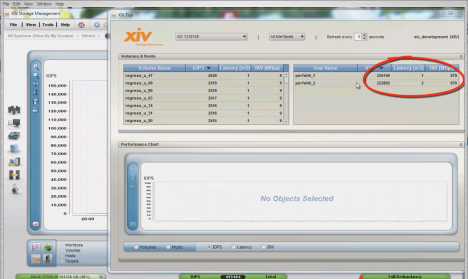

Thanks to Mert Baki
Filed under: XIV | 14 Comments »
So here’s a quick comparison of XIV Gen3 and Gen2 with some competitors. Note that ESRP is designed to be more of a proof of concept than a benchmark, but it has a performance component which is relevant. Exchange 2010 has reduced disk I/O over Exchange 2007 which has allowed vendors to switch to using 7200 RPM drives for the testing.
The ESRP reports are actually quite confusing to read since they test a fail-over situation so require two disk systems, but some of the info in them relates to a single disk system. I have chosen to include both machines in everything for consistency. The XIV report may not be up on the website for a few days.
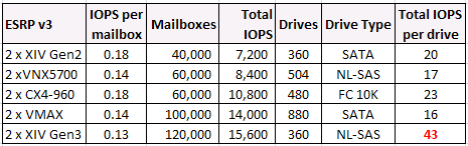
Once again XIV demonstrates its uniqueness in not being a just another drive-dominated architecture. Performance on XIV is about intelligent use of distributed grid caches:
And to answer a question asked on my earlier post. No these XIV results do not include SSD drives, although the XIV is now SSD-ready and IBM has issued a statement of direction saying that up to 7.5TB of PCIe-SSD cache is planned for 1H 2012. Maybe that’s 15 x 500GB SSDs (one per grid node).
Filed under: XIV | 4 Comments »
there was a loud xiv as the new IBM system arrived and the other vendors’ disk systems all collapsed under the weight of their own complexity
XIV Generation 3 is here and XIV Generation 2 remains in the family. Here is a quick sampler of Gen3 Vs Gen2 performance:
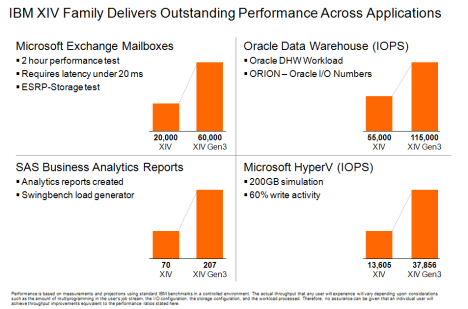
For more information on today’s announcements check out the XIV product page on ibm.com and the general overview on youtube.
Some of you might also consider that XIV Gen3’s use of Infiniband interconnect and NL-SAS drives brings new relevance to my two recent blog posts on those subjects : )
Filed under: XIV | 3 Comments »
Maybe you think NL-SAS is old news and it’s already swept SATA aside?

Well if you check out the specs on FAS, Isilon, 3PAR, or VMAX, or even the monolithic VSP, you will see that they all list SATA drives, not NL-SAS on their spec sheets.
Of the serious contenders, it seems that only VNX, Ibrix, IBM SONAS, IBM XIV Gen3 and IBM Storwize V7000 have made the move to NL-SAS so far.
First we had PATA (Parallel ATA) and then SATA drives, and then for a while we had FATA drives (Fibre Channel attached ATA) or what EMC at one point confusingly marketed as “low-cost Fibre Channel”. These were ATA drive mechanics, with SCSI command sets handled by a FC front-end on the drive.
Now we have drives that are being referred to as Capacity-Optimized SAS, or Nearline SAS (NL-SAS) both of which terms once again have the potential to be confusing. NL-SAS is a similar concept to FATA – mechanically an ATA drive (head, media, rotational speed) – but with a SAS interface (rather than a FC bridge) to handle the SCSI command set.
When SCSI made the jump from parallel to serial the designers took the opportunity to build in compatibility with SATA via a SATA tunneling protocol, so SAS controllers can support both SAS and SATA drives.
The reason we use ATA drive mechanics is that they have higher capacity and a lower price. So what are some of the advantages of using NL-SAS drives, over using traditional SATA drives?
And with only a small price premium over traditional SATA, it seems pretty clear to me that NL-SAS will soon come to dominate and SATA will be phased out over time.
NL-SAS drives also offer the option of T10 PI (SCSI Protection Information) which adds 8 bytes of data integrity field to each 512b disk block. The 8 bytes is split into three chunks allowing for cyclic redundancy check, application tagging (e.g.RAID information), and reference tagging to make sure the data blocks arrive in the right order. I expect 2012 to be a big year for PI deployment.
I’m assured that the photograph below is of a SAS engineer – maybe he’s testing the effectiveness of the PI extensions on the disk drive in his pocket?

Filed under: SONAS, Storwize V7000, XIV | 9 Comments »
Not here this time… over there >>>
This week I’m doing a guest blogging spot over at Barry Whyte’s storage virtualizatiom blog, so if you want to read this week’s post head over to: https://www.ibm.com/developerworks/mydeveloperworks/blogs/storagevirtualization/entry/infinity_and_beyond?lang=en
p.s. Infiniband is the new interconnect being used in XIV Gen3
Filed under: SONAS, XIV | 1 Comment »
IBM recently announced that two Storwize V7000 systems could be clustered, in pretty much exactly the same way that two iogroups can be clustered in a SAN Volume Controller environment. Clustering two Storwize V7000s creates a system with up to 480 drives and any of the paired controllers can access any of the storage pools. Barry Whyte went one step further and said that if you apply for an RPQ you can cluster up to four Storwize V7000s (up to 960 drives). Continue reading
Filed under: SAN Volume Controller, Storwize V7000, XIV | 16 Comments »
In 1978 IBM employee Norman Ken Ouchi was awarded patent 4092732 for a “System for recovering data stored in failed memory unit.” Technology that would later be known as RAID 5 with full stripe writes.
Hands up who’s still doing that or its RAID6 derivative 33 years later?
I have a particular distaste for technologies that need to be manually tuned. Continue reading
Filed under: N Series, SAN Volume Controller, Storwize V7000, XIV | 2 Comments »
There have been a raft of new storage efficiency elements brought to market in the last few years, but what has become obvious is that you can’t yet get it all in one product. Continue reading
Filed under: DS8000, N Series, ProtecTIER, SAN Volume Controller, SONAS, Storwize V7000, The Nature of Man, Tivoli, XIV | Leave a comment »
I was invited to Netapp insight 2010 in December and I didn’t get a chance to write much about that at the time being end of year rush and all. So here are some thoughts. IBM N Series and Netapp are essentially the same thing so I will use either term generically. I’m not mentioning presenters names as I’m not 100% sure the names on the slide decks I have were the actual presenters in Macau. Disclosure here is that not only do I work for IBM, but Netapp funded my trip to Macau. Even though I booked my 3 days solid there were still a lot of good sessions I couldn’t get to because of conflicts. Continue reading
Filed under: N Series | 1 Comment »
Just a quick hit and run blog post for today… This table authored by Karl Hohenauer just came into my inbox. With the changes in cable quality (OM3, OM4) the supported fibre channel distances have confused a few people, so this will be a good reference doc to remember. Continue reading
Filed under: DS8000, N Series, SAN Volume Controller, Storwize V7000, XIV | 5 Comments »
With everyone announcing best-of type choices for 2010 I thought I’d take a slightly less serious approach and announce my favourite product of 2010 that never was – a product so cool that either no-one but me thought of it, or more likely, it somehow doesn’t stack up technically or cost-wise. Continue reading
Filed under: XIV | 2 Comments »
Everyone agrees that enterprise-class SSDs from companies like STEC Inc are fast, and cool, and pretty nice. Most people also realise that SSDs are an order of magnitude more expensive than SAS drives, and that there is no expectation that this will change dramatically within the next 5 years. This means we have to figure out how to leverage SSDs without buying a whole lot of them. Continue reading
Filed under: DS8000, N Series, Storwize V7000 | 4 Comments »
This post is in response to the discussion around my recent Easy Tier performance post. Continue reading
Filed under: DS8000, N Series, SAN Volume Controller, Storwize V7000 | 9 Comments »
When IBM released it’s SPC-1 Easy Tier benchmark on DS8000 earlier this year, it was done with SATA RAID10 and SSD RAID10, so when we announced Storwize V7000 with Easy Tier for the midrange, the natural assumption was to pair SATA RAID10 and SSD RAID10 again. But it seems to me that 600GB SAS RAID6 + SSD might be a better combination than 2TB SATA RAID10 + SSD. Continue reading
Filed under: N Series, Storwize V7000 | 15 Comments »
In Tracey Kidder’s book “Soul of a New Machine” I recall Data General’s Tom West as saying that the design that the team at Data General came up with for the MV/8000 minicomputer was so complex that he was worried. He had a friend who had just purchased a first run Digital Equipment Corp VAX, and Tom went to visit him and picked through the VAX main boards counting and recording the IDs of all of the components used. He then realised that his design wasn’t so complex after all, compared to the VAX and so Tom proceeded to build the MV/8000 with confidence.
In this example, deconstruction of one product helped Tom to understand another product, and sanity check that he wasn’t making things too complicated. It didn’t tell him if MV/8000 would be better than VAX however.
I have many times seen buyers approach a storage solution evaluation using a deconstructionist approach. Once a solution is broken down into its isolated elements, it can be compared at a component level to another very different solution. It’s a pointless exercise in most cases. Continue reading
Filed under: N Series, Storwize V7000, The Nature of Man, XIV | 3 Comments »
I learned something new recently. SVC has QoS, and has had it for quite some time (maybe since day 1?). Continue reading
Filed under: SAN Volume Controller, Storwize V7000 | 1 Comment »
Yes, IBM has announced a new midrange virtualized disk system, the Storwize V7000. A veritable CLARiiON-killer : ) Continue reading
Filed under: DS8000, SAN Volume Controller, Storwize V7000, XIV | 21 Comments »
IDC defines three categories of external disk. The midrange market leaders are EMC, Netapp and IBM (followed by Dell and HP with both slipping slightly over the last 12 months). Netapp is almost entirely a midrange business, while EMC and IBM are the market leaders in highend. Over the last 4 quarters midrange has accounted for almost half of the spending in external disk (cf just over a quarter on highend) so clearly midrange is where the action is. Continue reading
Filed under: DS8000, N Series, SAN Volume Controller, XIV | 3 Comments »
Over at Techcrunch Michael Arrington has been talking about alleged illegal collusion amongst angel investors in Silicon Valley.
It always amuses me that people expect an economy based on competition and maximising one’s profits to provide a basis for fair play. Continue reading
Filed under: The Nature of Man | Tagged: Open source | 1 Comment »
I am starting to see the term ‘data reduction’ cropping up all over the place and being used to mean either compression or deduplication. I have a couple of objections to this.
Filed under: N Series | Tagged: Data compression, Data deduplication, Storage efficiency | 4 Comments »
There are four reasons I can think of why a company wants to buy another:
Filed under: DS8000, N Series, ProtecTIER, Tivoli, VMware, XIV | 1 Comment »

IBM SAN Volume Controller & HDS USP
It’s been 7 years since IBM released SAN Volume Controller and brought multi-vendor storage virtualization and volume mobility to the mainstream market. SVC provides virtualization in the storage network layer, rather than within a disk system, and IBM has shipped more than 10,000 I/O groups (SVC node pairs).
HDS meanwhile took a different tack. They followed SVC by about 12 months, and have delivered virtualization in the disk system but with the ability to manage external disk systems just as SVC does.
SVC arguably has some advantages in ease of use around data migration, flexible object naming and optimizing performance from external systems (especially when using thin provisioning) but there is no doubt that USP/V and USP/VM are both very solid players in the storage virtualization space.
Both approaches (virtualization-in-the-network and virtualization-in-the-disk-system) are valid. It would be nice to think that one design could address all segments of the market, but it seems to me that each has its sweet spot. Continue reading
Filed under: SAN Volume Controller | 1 Comment »
Vendors often struggle to be strong in all market segments and address the broad range of customer requirements with a limited range of products. Products that fit well into one segment don’t always translate well to others, especially when trying to bridge both midrange and enterprise requirements. Continue reading
Filed under: Storwize V7000, XIV | 2 Comments »
Well the whole snapshot and replication thing got me thinking about vendor licensing. Licensing is a way to get a return on one’s R&D, it doesn’t really matter whether customers pay x for hardware and y for software, or x+y for the hardware ‘solution’ and zero for software functions etc, as long as the vendor gets the return it needs to keep its investors happy.
Vendor charges are like taxes, most of us appreciate that they are needed, but there are many different ways to levy the tax: e.g. flat tax rate, progressive, regressive, goods and services (GST/VAT/SalesTax).
I suspect that charging large licence fees for snapshot and replication functions has held IT back and IMHO the time has now come to set these functions free. Continue reading
Filed under: DS8000, N Series, ProtecTIER, SAN Volume Controller, SONAS, XIV | 5 Comments »
Every storage vendor has sales slides that tell us that data growth rates are accelerating and the world will explode soon unless you buy their product to manage that…
…and yet the average IT shop is still mostly doing backups the old fashioned way, with weekly fulls and daily incrementals, and scratching their heads about how they are going to cope next year, given that the current full is taking 48 hours. They probably have a whole bunch of SATA disk somewhere that acts as the initial backup target, but it doesn’t go faster than tape, which is something they probably assumed it would do when they bought it, but somehow they feel that their backups to disk are probably a good thing anyway even though they’re more expensive… Continue reading
Filed under: N Series, Tivoli, XIV | 2 Comments »
Dedup is happening fast all around us and the vendors are lining up, but it’s not always easy to compare what’s going on. Continue reading
Filed under: N Series, ProtecTIER | 2 Comments »
IBM’s Z10 Enterprise Linux Server is an interesting alternative to a large-scale VMware deployment. Essentially, any Linux workload that is a good fit for being virtualised with Vmware is a good fit for being virtualised on Z10. Continue reading
Filed under: DS8000, SAN Volume Controller, VMware, XIV | Leave a comment »
So you know we’re making progress on the binary units thing (see my post entitled “How many fingers am I holding up“) when Piratebay.org starts using GiB…
7,368,671,232 Bytes = 7.37 GB or 6.86 GiB

Now if we can only get the IT vendor community to consistently follow Piratebay’s excellent example : )
Filed under: DS8000, N Series, SAN Volume Controller, Tivoli, XIV | Leave a comment »
Snapshot-based Replication/Mirroring:
I thought it might be worth taking a quick look at async (snapshot) replication/mirroring which was released for XIV earlier this year with 10.2.0.a of the firmware. XIV async is similar in concept to Netapp’s async SnapMirror, both are snapshot based and both consume snapshot space as a part of the mirroring process. One difference of course is that with XIV both async and sync replication are included in the base price of the XIV, there is no added licence fee or maintenance fee to pay. I’d call it ‘free’ but I’d just get another bunch of people on twitter telling me they still haven’t received their free XIVs yet… Continue reading
Filed under: VMware, XIV | 2 Comments »
I seem to have been doing a lot of work recently on solutions that involve IBM N Series (Netapp) products. There are a few annoying things about the product (e.g. the price, fractional reserve) but there are some things I really like, and they’re not necessarily exciting things or things that we make a big deal about in sales presentations, but they’re the kind of solid features that make a storage architect’s life that bit easier and the pursuit of elegance that little bit more achievable. Continue reading
Filed under: N Series | 2 Comments »
The base2 Vs base10 nett capacity question is an interesting one. It remains a place of confusion for customers and that’s not surprising as it remains a place of confusion for vendors also. Continue reading
Filed under: DS8000, N Series, SAN Volume Controller, SONAS, Tivoli, XIV | Tagged: binary, Capacity, decimal, IBM, N Series, Netapp, storage | 5 Comments »
One thing I left off this post is a discussion of fractional reserve. This can be a major and I should have covered it. Some people allow 100% extra space when provisioning LUNs out of ONTAP. FR is about guaranteeing that you have space to write changed blocks in your active filesystem. It’s hard to explain it clearly – I’ve seen many try and fail. I myself find it confusing and complicated and just when I think I understand it, I end up with more questions. So I will just issue a general warning that if you are creating LUNs under ONTAP and you have snapshotting enabled, then discuss with your installer how much space needs to be set aside for the FR.
[Now updated to include base2 results]
I thought a quick post on calculating nett capacity with IBM N Series might be in order, since we have been caught out once or twice with this in the past. Hopefully this post will help others avoid problems of accidental under-capacity. Continue reading
Filed under: N Series | Tagged: Capacity, N Series, Netapp | 7 Comments »
IBM has just published a very cool 33,000 IOPS SPC-1 benchmark result for the DS8000 using 96 x SATA and 16 x SSDs (not a FC drive in sight!) and with a max latency well under 5ms.
I’m impressed. This is a great piece of engineering.
Easy Tier was left to automatically learn the SPC-1 benchmark and respond (again, automatically). I won’t waffle on about it, but will just show you the graph of the various results seeing as the doc I took this from doesn’t say IBM Confidential anywhere : )
 [Update: confirmed that the 192 drives in green are indeed 15KRPM drives]
I guess what we’d all like to see now is a significant drop in the cost of SSDs. I’m sure it’s coming.
Barry Whyte is on record as saying that Easy Tier will makes its way into SAN Volume Controller later this year. XIV does something vaguely analogous using distributed caches. Storage is fun!
Filed under: DS8000, SAN Volume Controller | Tagged: EasyTier, IBM, SATA, SPC-1, SSD, storage | 4 Comments »
Whether XIV is a visionary way to reduce your storage TCO, or just a bizarre piece of foolishness as some bloggers would have you believe, is being tested daily, and every day that passes with large customers enjoying the freedom of XIV ease of use, performance and reliability, is another vote for it being a visionary product.
XIV has been criticised because there is a chance that it might break, just like every other storage system that has ever been invented, yet because XIV is a little different, the nay-sayers somehow feel that non-perfection is a sin.
So let’s talk about non-perfection in an old-style storage architecture. Continue reading
Filed under: XIV | 3 Comments »
If you’re a big XIV fan, one of the things you might love about it is the built-in (i.e. ‘free’) monitoring tools that are really easy to use.

Also the xivtop utility which will be immediately familiar to anyone who has used ‘top’ on linux or UNIX systems.

But for many others in the non-XIV world, layered monitoring tools are a pain in the wallet and also a pain in the administrative butt. Continue reading
Filed under: Tivoli, XIV | 2 Comments »
| Double Drive Failure… on XIV Drive Management | |
 | PatrickWab on IBM’s New Midrange with… |
| Build Your Own Scala… on IBM’s Scale-out FlashSys… | |
 | Vern Bastable on FCIP Routers – A Best Pr… |
| The Simple Truths… on IBM Storwize 7.2 wins by a… | |
 | Eric_Ozz on Comprestimator Guesstimator |
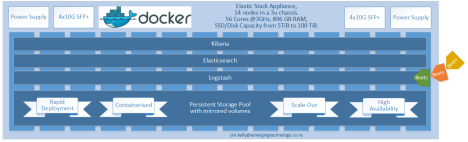

 We're all only here temporarily...